
February 13, 2026
12 Best Software for Process Documentation in 2026
Discover the best software for process documentation. We compare 12 top tools with features, pricing, and use cases to help you standardize your workflows.
Inconsistent outcomes, painfully slow onboarding, and critical knowledge walking out the door every time an employee leaves. This is the high cost of relying on "tribal knowledge" to run your business. In 2026, efficient, well-documented operations are not just an advantage; they are a fundamental requirement for sustainable growth and scalability. Scattered processes create friction, waste resources, and ultimately limit your potential.
The solution lies in dedicated software for process documentation. These platforms transform chaotic, ad-hoc workflows into a centralized, accessible, and scalable operational playbook. Moving beyond messy shared documents, this software provides the structure and features needed to create, maintain, and distribute standard operating procedures (SOPs) effectively. Before exploring the tools, ensuring you have a solid grasp of the core principles is crucial for success; you can build a strong foundation by understanding process documentation and its strategic value.
This comprehensive guide is designed to help you find the perfect tool for your specific needs. We've analyzed the top solutions on the market, breaking them down into distinct categories:
Automated Capture Tools: Instantly generate step-by-step guides by recording your screen.
Checklist-Driven Platforms: Ideal for managing recurring, structured tasks and ensuring compliance.
Flexible Knowledge Bases: Versatile systems for building comprehensive internal or external wikis.
We'll dive deep into each platform, providing an unbiased comparison of features, pricing, and ideal use cases. Whether you're an agency creating client deliverables, an HR manager standardizing onboarding, or an SMB seeking operational clarity, this article provides the detailed insights you need to make an informed decision. Each review includes screenshots and direct links to help you evaluate the best software for process documentation for your team.
1. Scribe
Scribe revolutionizes the creation of step-by-step guides by automating the most tedious part of the process: capturing screenshots and writing instructions. This browser extension and desktop app records your workflow as you perform it, automatically generating a visual guide complete with annotated screenshots and descriptive text for each click and keystroke. This makes it an exceptional piece of software for process documentation, especially for teams that need to create a high volume of tutorials quickly.
The platform is incredibly intuitive, requiring almost no training. After capture, you can easily edit text, add more detail, or redact sensitive information before sharing. Guides can be embedded directly into other platforms, exported as PDFs, or shared via a simple link, making it versatile for internal and external use.
Key Details & Use Cases
Best For: Customer support teams creating troubleshooting guides, operations managers documenting internal software workflows, and agencies delivering client SOPs.
Key Features: One-click workflow capture, auto-generated text and screenshots, redaction tools, shareable links, and team libraries.
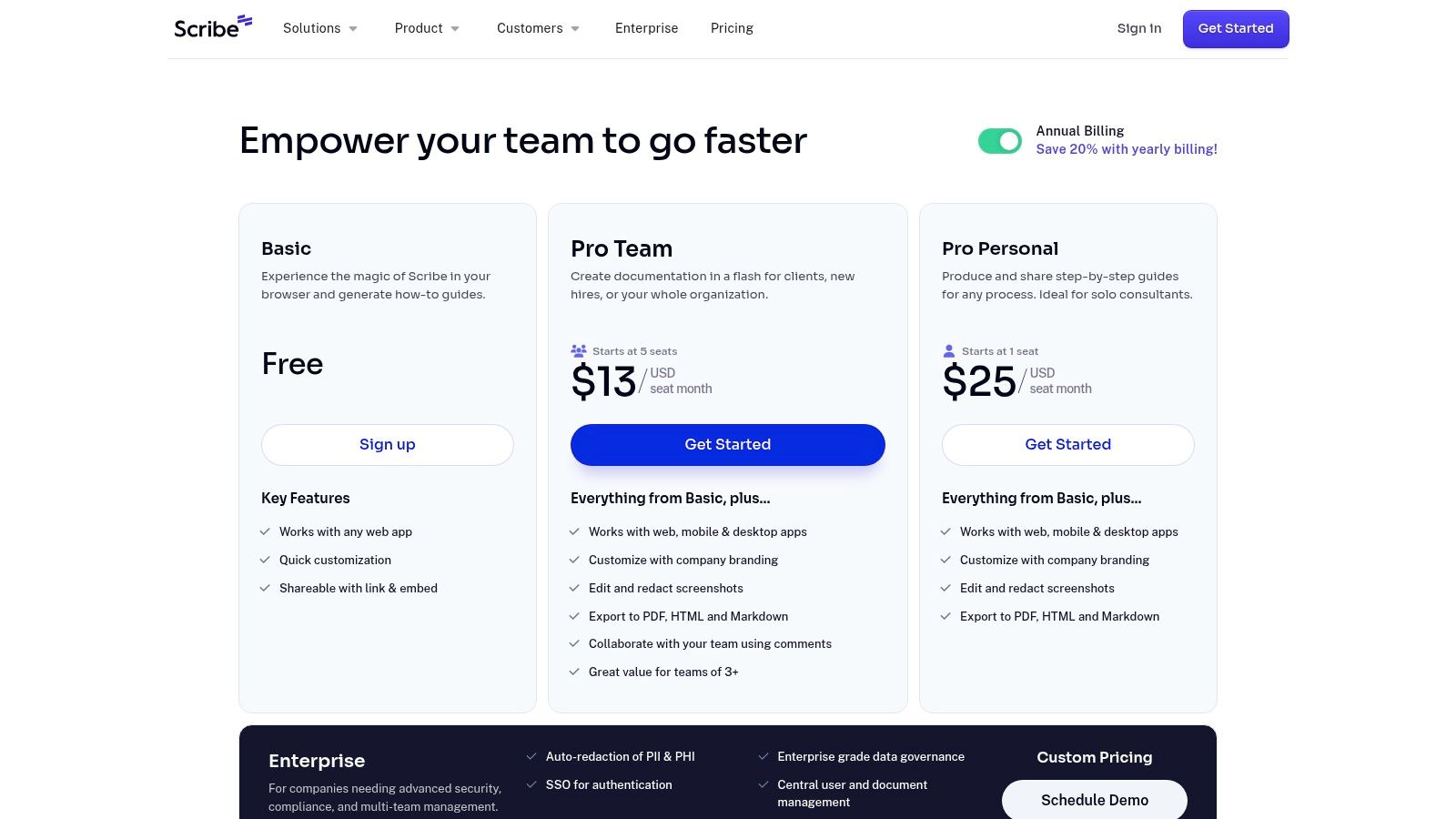
Pricing: A free Basic plan is available for individuals. The Pro plan (starting at $23/seat/month) adds desktop capture and branding. Enterprise plans offer advanced security and governance.
Pros: Extremely fast and easy to use, significantly reducing the time spent on documentation. The user interface is clean and user-friendly.
Cons: Not designed for video-based tutorials; its strength is static, step-by-step guides. Advanced security features like SSO are limited to the higher-tier Enterprise plan.
For more details, visit Scribe's pricing page.
2. Scribe
Scribe revolutionizes the creation of step-by-step guides by automating the most tedious part of the process: capturing screenshots and writing instructions. This browser extension and desktop app records your workflow as you perform it, automatically generating a visual guide complete with annotated screenshots and descriptive text for each click and keystroke. This makes it an exceptional piece of software for process documentation, especially for teams that need to create a high volume of tutorials quickly.
The platform is incredibly intuitive, requiring almost no training. After capture, you can easily edit text, add more detail, or redact sensitive information before sharing. Guides can be embedded directly into other platforms, exported as PDFs, or shared via a simple link, making it versatile for both internal and external use. Scribe's speed and simplicity make it a go-to for standardizing processes without the traditional time investment.
Key Details & Use Cases
Best For: Customer support teams creating troubleshooting guides, operations managers documenting internal software workflows, and agencies delivering client SOPs.
Key Features: One-click workflow capture, auto-generated text and screenshots, redaction tools, shareable links, and team libraries.
Pricing: A free Basic plan is available for individuals. The Pro plan (starting at $23/seat/month) adds desktop capture and branding. Enterprise plans offer advanced security and governance.
Pros: Extremely fast and easy to use, significantly reducing the time spent on documentation. The user interface is clean and user-friendly.
Cons: Not designed for video-based tutorials; its strength is static, step-by-step guides. Advanced security features like SSO are limited to the higher-tier Enterprise plan.
For more details, visit Scribe's pricing page.
3. Tango
Tango offers an AI-assisted approach to creating walkthroughs and SOPs by automatically capturing browser and desktop actions. As you work, it generates a polished guide with screenshots, annotations, and step-by-step instructions. This makes it an excellent choice of software for process documentation for teams needing to produce branded, professional-looking guides for both internal training and customer-facing support.
The platform stands out by producing clean, immediately actionable outputs that can be customized with your company's branding. Beyond simple guide creation, Tango offers features like workflow analytics to see how your documentation is being used and version history to manage updates. It also has an optional tier for creating interactive, on-screen walkthroughs, bridging the gap between static documents and in-app guidance.
Key Details & Use Cases
Best For: Customer success teams building product tutorials, operations managers standardizing workflows, and agencies delivering branded SOPs to clients.
Key Features: Automatic capture for desktop and browser, branded exports, PII blurring, version history, workflow analytics, and optional on-screen guidance.
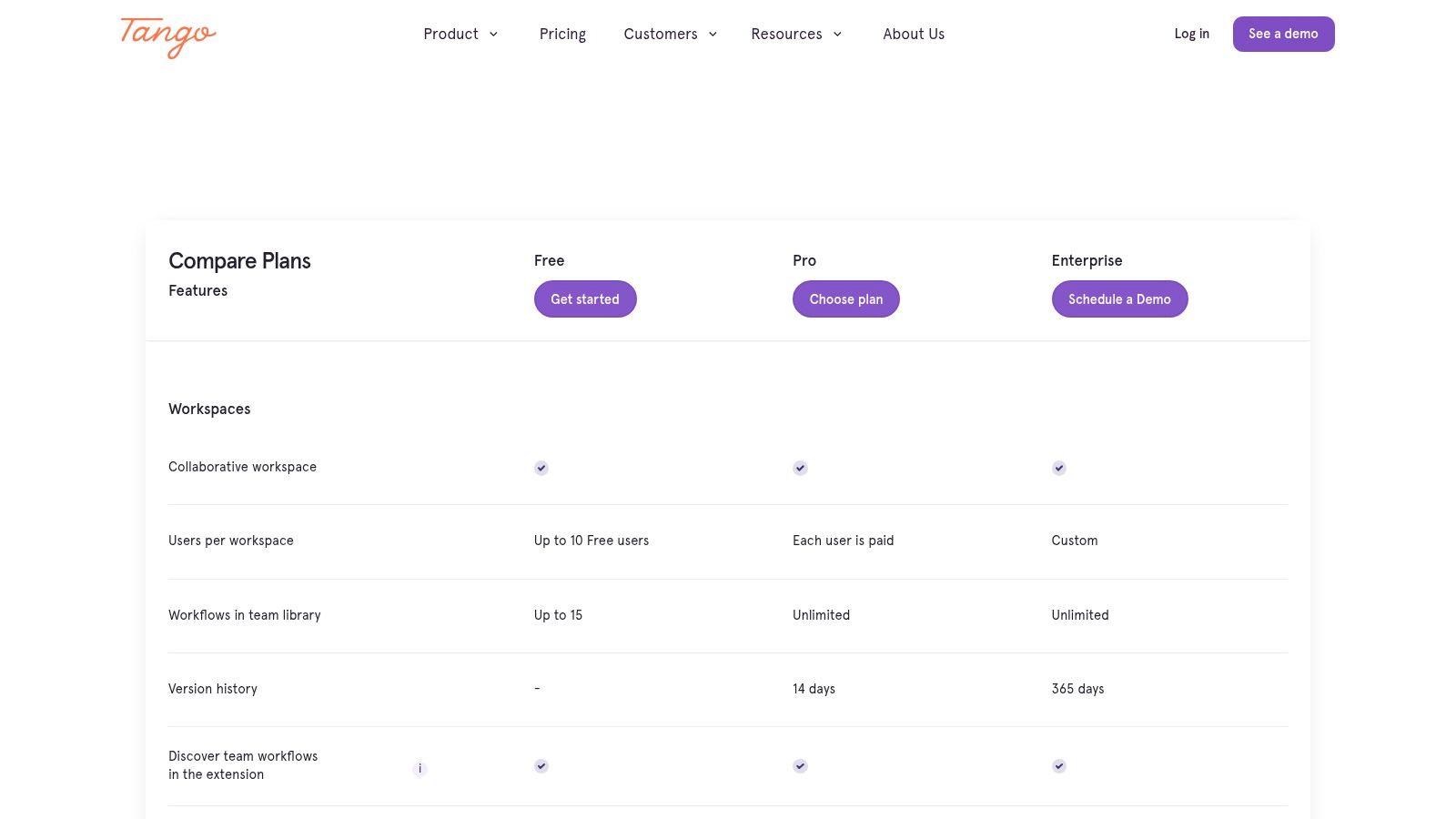
Pricing: A free plan is available with limits on workflows and users. The Pro plan starts at $16/user/month (billed annually) for unlimited workflows. The Business plan adds branding and analytics, while Enterprise offers SSO and advanced security.
Pros: Produces highly polished and professional-looking guides with minimal effort. Scales well from individual users to large organizations needing governance and analytics.
Cons: The per-seat pricing model can become costly for organizations with many documentation contributors. The free plan's limitations may be restrictive for team use.
For more details, visit Tango's pricing page.
4. Process Street
Process Street transforms static documents into interactive, actionable checklists and workflows. Instead of just creating a guide that sits in a folder, this platform allows teams to operationalize their procedures by running checklists, assigning tasks, and tracking progress in real-time. This makes it powerful software for process documentation when compliance and accountability are critical, turning standard operating procedures into living, automated processes.
The platform excels at managing recurring tasks like employee onboarding, client intake, or monthly financial closures. With features like conditional logic, tasks can dynamically appear based on previous steps, ensuring workflows adapt to different scenarios. You can also integrate it with hundreds of other apps to automate handoffs between systems, making it a central hub for process execution, not just documentation.
Key Details & Use Cases
Best For: Operations teams managing recurring workflows, HR departments standardizing onboarding and offboarding, and agencies ensuring consistent client service delivery.
Key Features: Interactive checklists with conditional logic, task assignments and dynamic due dates, approval workflows, integrations with Slack and Salesforce, and detailed reporting on checklist runs.
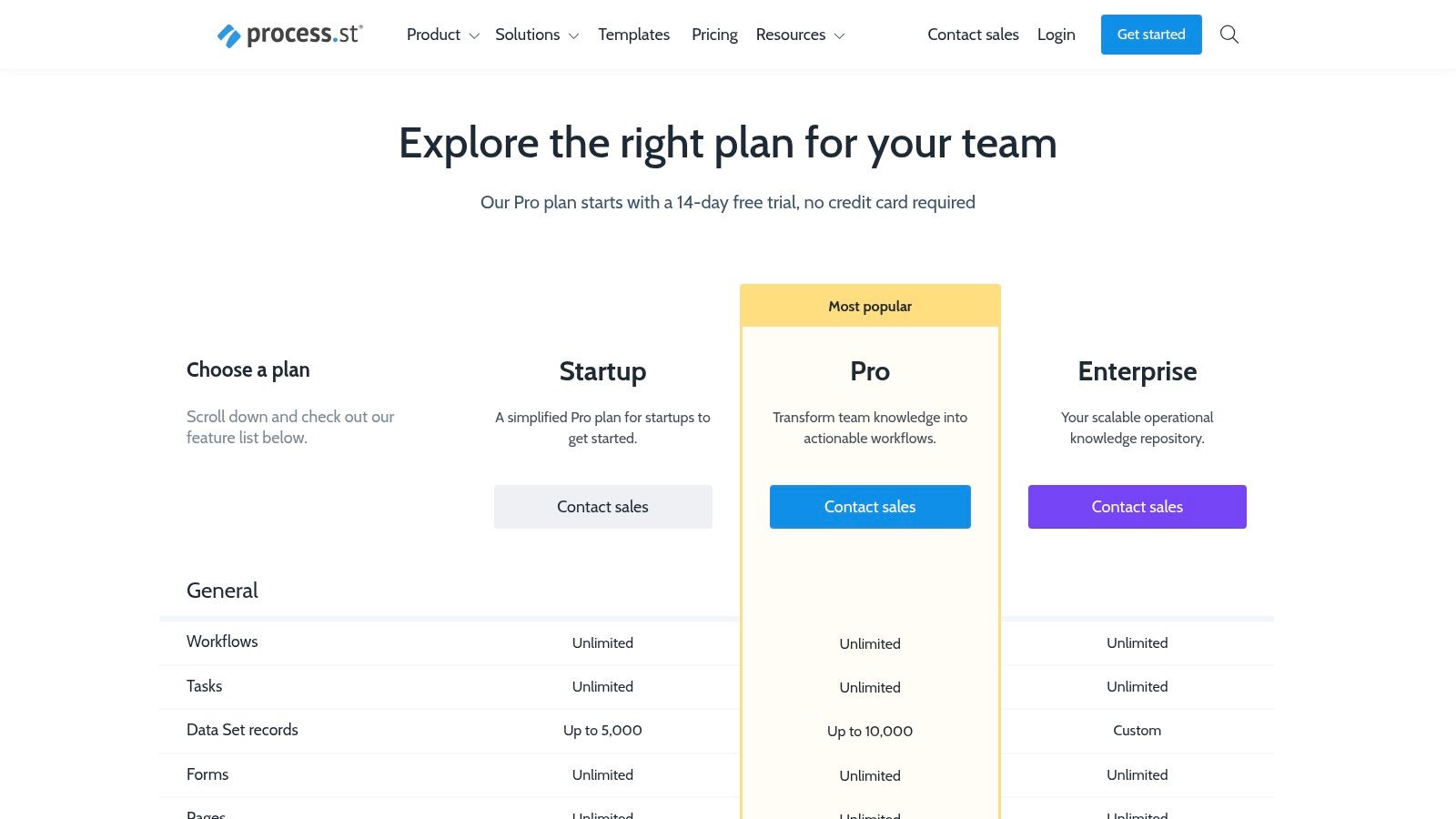
Pricing: Process Street focuses on sales-assisted plans. The Startup plan is $100/month for 5 members, and the Pro plan is $415/month for 10 members. Custom Enterprise plans are also available.
Pros: Excellent for enforcing compliance and standardizing recurring operational tasks. Robust tracking, permissions, and automation capabilities.
Cons: Setup can be more complex than simple screen capture tools. The pricing structure is geared towards teams and can be a significant investment.
For more information, visit Process Street's pricing page.
5. SweetProcess
SweetProcess is a purpose-built platform that focuses on creating, managing, and tracking procedures, policies, and checklists. It streamlines the entire SOP lifecycle, from creation and version control to employee assignment and task completion. This makes it an effective piece of software for process documentation for teams that need more than a simple guide creator and want to integrate documentation directly into their operational workflows. Its strength lies in turning static documents into actionable, trackable tasks.
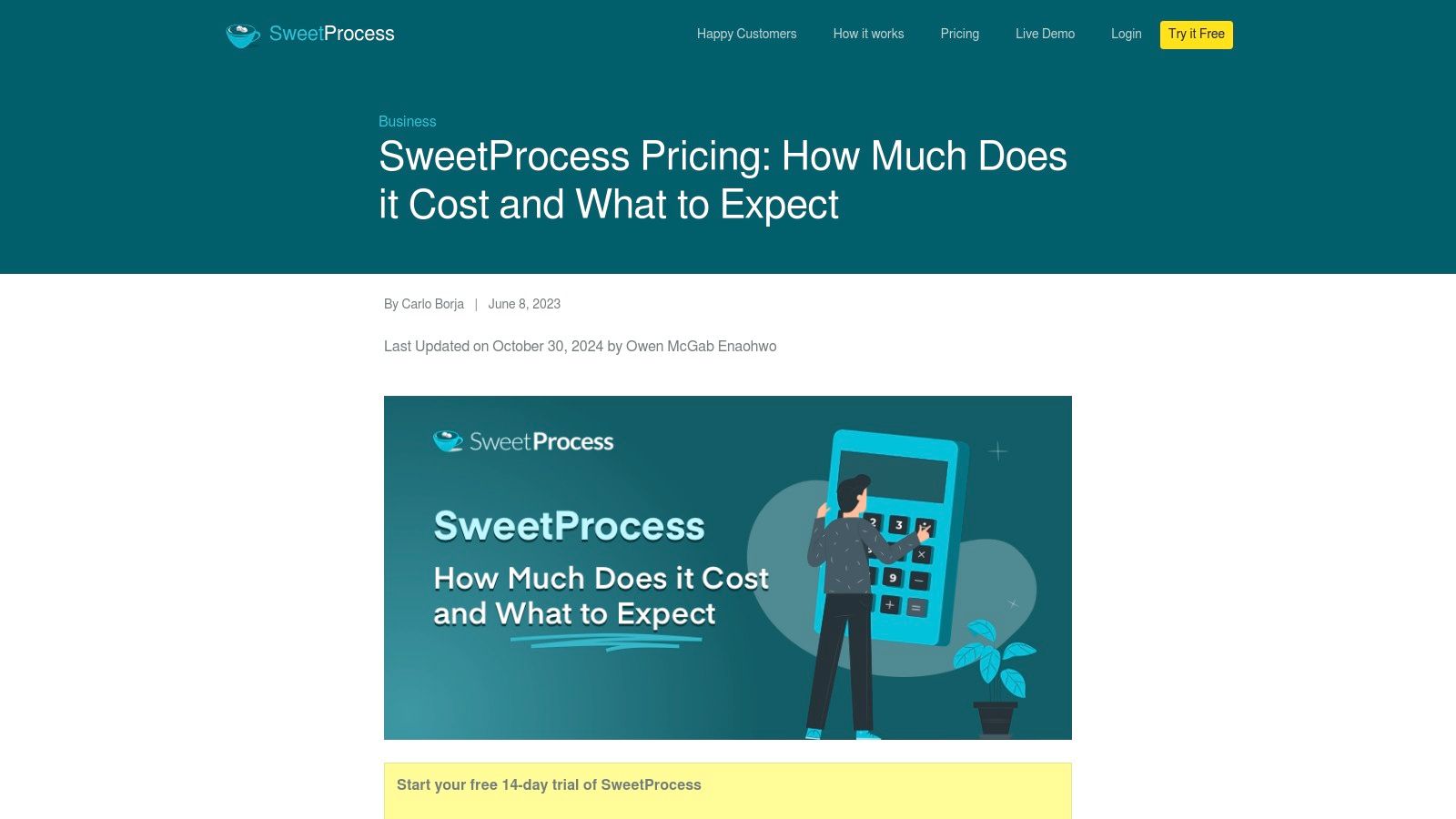
The platform is designed for clarity and accountability. Managers can see who has completed required procedures and when, ensuring compliance and standardization across the organization. It allows teams to build a centralized knowledge base that is easy to navigate and maintain, with features like version history ensuring that everyone is always working from the most current information. The user interface is straightforward, designed to get teams documenting and executing processes without a steep learning curve.
Key Details & Use Cases
Best For: Operations managers enforcing compliance, HR departments standardizing onboarding checklists, and service businesses ensuring consistent quality delivery.
Key Features: Document procedures, policies, and checklists; assign and track tasks; version history; knowledge base creation; and integrations with over 1,000 apps via Zapier.
Pricing: A single plan at $99/month includes up to 20 active team members, with each additional member costing $5/month. A 14-day free trial is available.
Pros: Predictable pricing model is great for teams of up to 20. The 30-day money-back guarantee and fair active-member billing reduce risk.
Cons: The flat monthly fee may be less cost-effective for very small teams (1-3 people). It lacks some advanced LMS-style training features found in dedicated learning platforms.
For more details, visit SweetProcess's pricing page.
6. Trainual
Trainual is designed for businesses that want to transform their static SOPs into a dynamic, trackable training and onboarding system. It centralizes documentation, policies, and processes into an online "playbook," ensuring every team member has a single source of truth. More than just a repository, Trainual turns documentation into actionable training modules, making it a powerful piece of software for process documentation for scaling teams focused on standardization and accountability.
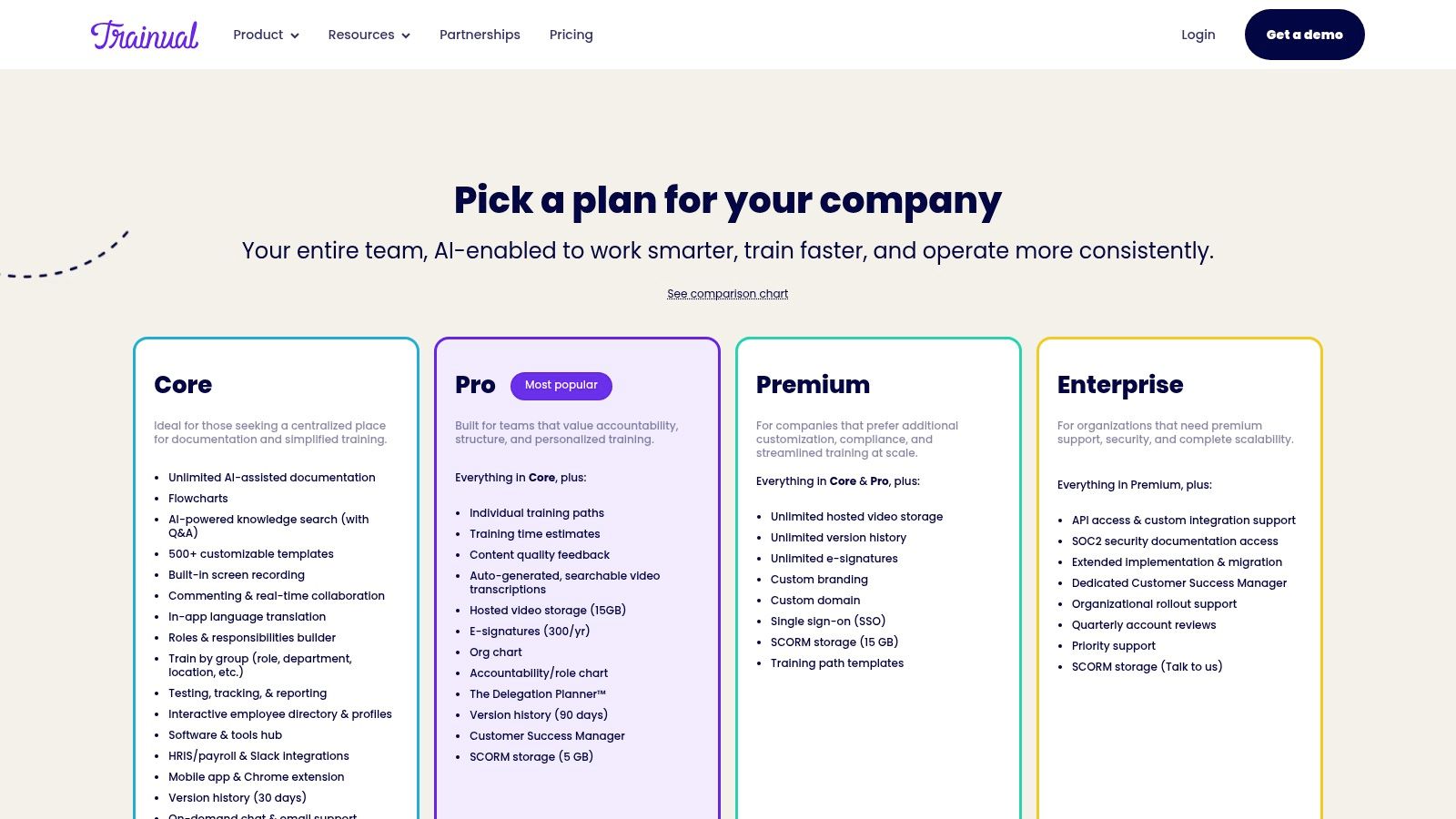
The platform empowers managers to assign specific content to roles or individuals, track completion, and test for understanding. This unique blend of documentation and learning management helps businesses onboard new hires faster and ensure operational consistency. Features like AI-assisted content creation and extensive templates help accelerate the initial setup process.
Key Details & Use Cases
Best For: Small to mid-sized businesses (SMBs) standardizing onboarding, franchise operations ensuring brand consistency, and HR managers formalizing company policies.
Key Features: AI-powered documentation, structured learning paths, automated tests and quizzes, e-signatures for policy attestation, reporting and analytics, and org charts.
Pricing: The Small Business plan starts at $250/month (billed annually) for 10 seats. The Growth Business plan at $417/month adds features like SCORM support and integrations. An implementation fee may apply.
Pros: Effectively combines documentation with onboarding and compliance features. Provides clear accountability through assigned due dates, learning paths, and progress reports.
Cons: Requires an annual commitment, and pricing is bundled in 10-seat packs, which can be more expensive than basic documentation tools for smaller teams.
For more details, visit Trainual's pricing page.
7. Notion
Notion is less a dedicated process documentation tool and more a flexible "all-in-one" workspace where teams can build custom knowledge bases and SOP hubs from the ground up. Its power lies in its modular system of pages, databases, checklists, and embeds, allowing organizations to create highly tailored libraries of process playbooks. This makes it a powerful choice as software for process documentation for teams that prioritize customization and want to centralize all company knowledge in one place.
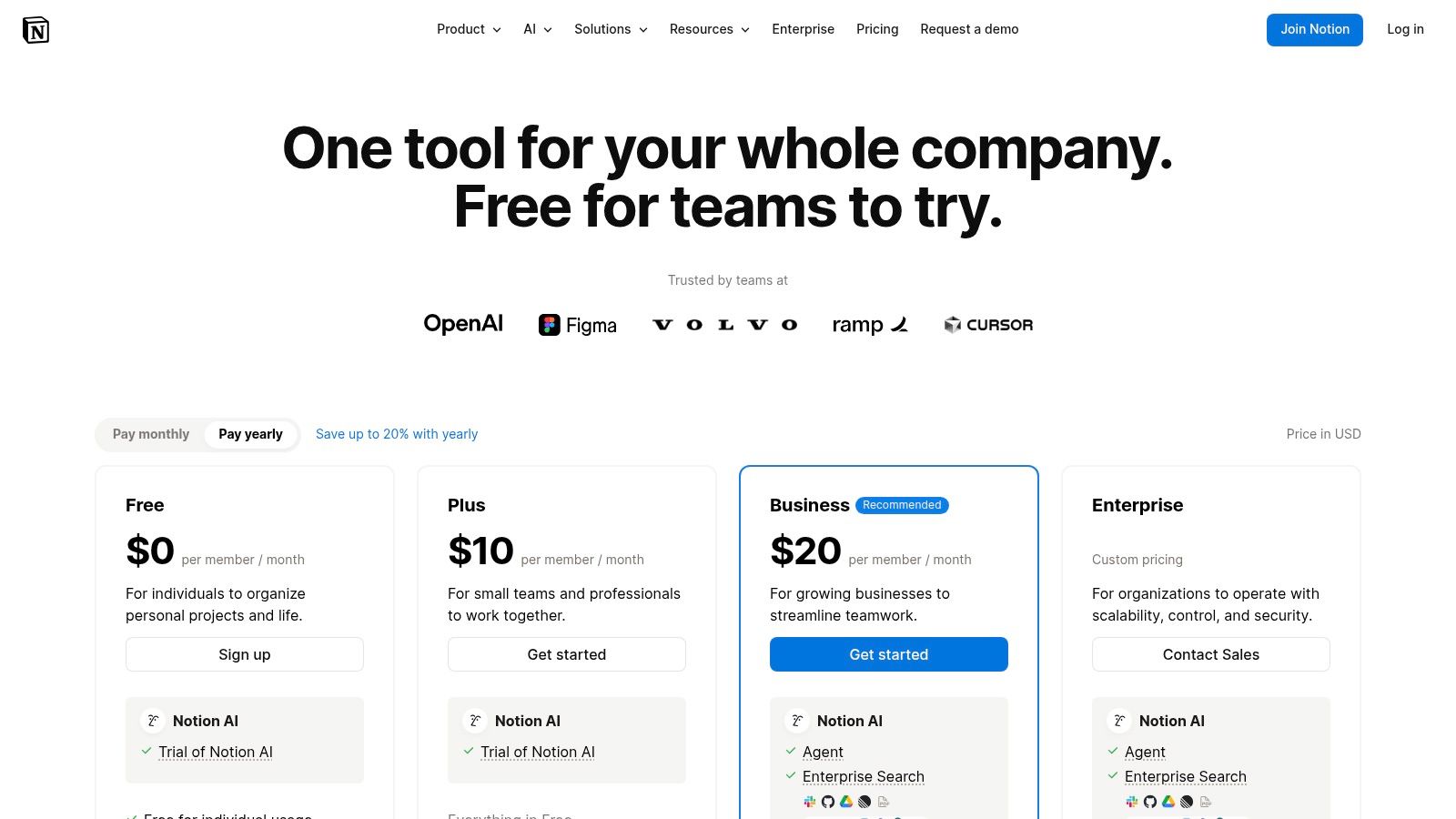
Unlike tools that automate screen capture, Notion requires manual creation of documents. However, its collaborative features, granular permissions, and robust integrations make it ideal for building and maintaining comprehensive, interconnected documentation systems. Teams can link SOPs to project boards, embed training videos, and use its powerful database features to track process ownership and update cycles.
Key Details & Use Cases
Best For: Operations teams building a central company wiki, agencies creating client-specific knowledge hubs, and teams that need a highly customizable documentation environment.
Key Features: Collaborative docs and databases, granular permissions, Notion AI for content generation and search, extensive template library, and a robust API for integrations.
Pricing: A generous Free plan is available for individuals. The Plus plan (starting at $8/user/month) adds more features for teams, while the Business plan ($15/user/month) includes SSO and advanced security.
Pros: Extremely flexible, allowing for completely custom SOP libraries and knowledge bases. Competitive pricing provides significant value and features per seat.
Cons: Lacks specialized features for auto-capturing on-screen steps. It requires strong internal governance and design discipline to maintain consistency and avoid becoming disorganized at scale.
For more details, visit Notion's pricing page.
8. Atlassian Confluence
Atlassian Confluence serves as an enterprise-grade team wiki, designed for organizations that need a centralized and powerful knowledge base. It excels at housing complex documentation like company policies, project plans, and detailed runbooks. Its primary strength lies in its deep integration with the Atlassian ecosystem, particularly Jira, making it a cornerstone piece of software for process documentation for teams already using Atlassian's project management tools.
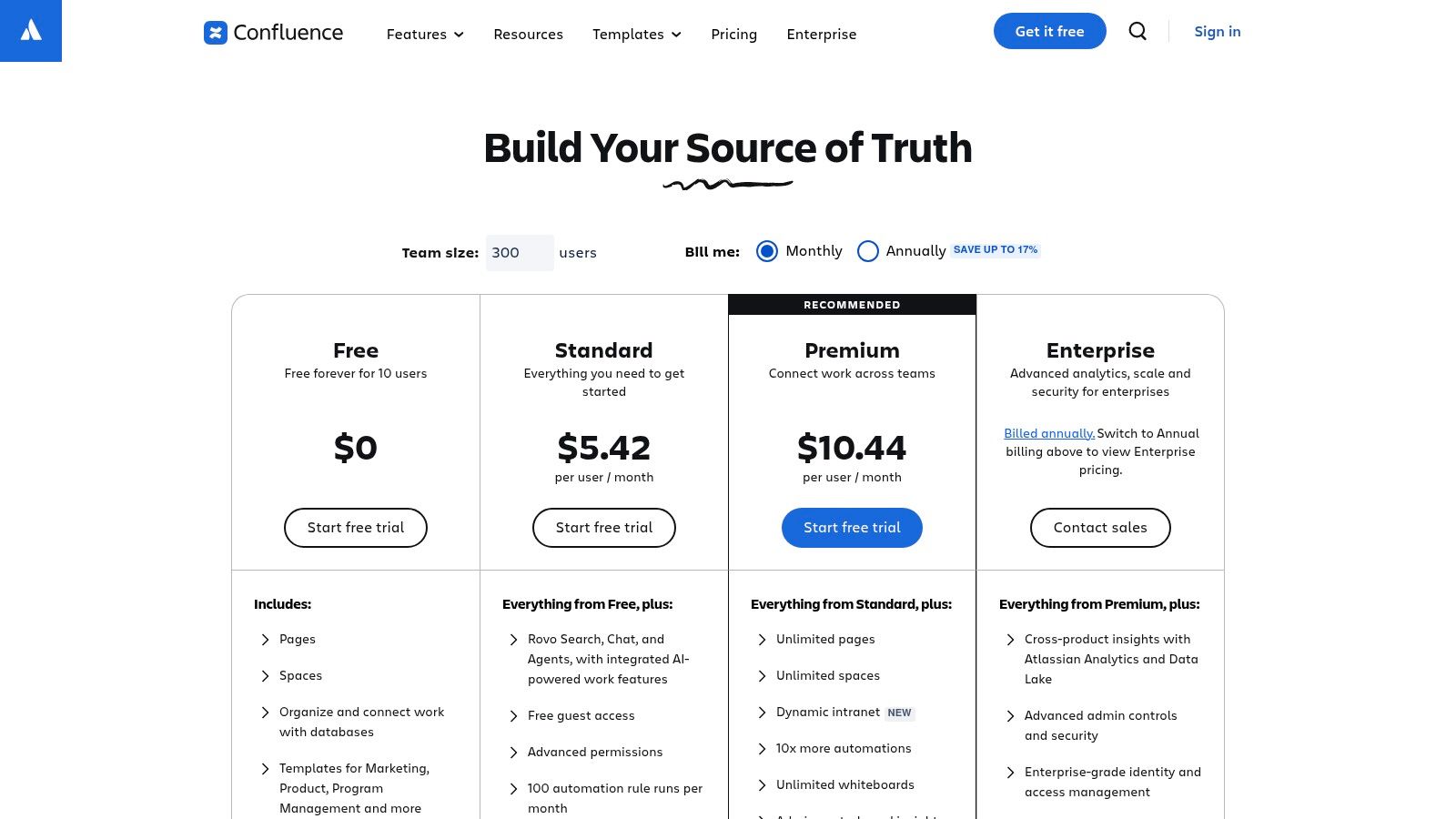
The platform is structured around "spaces" and "pages," which allows teams to organize information logically by project, department, or topic. With a rich text editor and a vast library of templates, creating structured documents for meeting notes, project requirements, or standard operating procedures is straightforward. Its collaborative features, such as inline comments and @mentions, facilitate real-time feedback and version control, ensuring documentation remains current and accurate.
Key Details & Use Cases
Best For: Engineering teams documenting technical specifications, large enterprises standardizing internal policies, and project managers centralizing knowledge alongside Jira tasks.
Key Features: Unlimited pages and spaces, policy and procedure templates, deep Jira integration, advanced user permissions, and robust search functionality.
Pricing: A Free plan supports up to 10 users. The Standard plan starts at $6.05/user/month, with Premium ($11.55/user/month) adding automation, analytics, and SSO.
Pros: Mature governance and permissioning controls are ideal for large organizations. The tight ecosystem integration with tools like Jira and Slack creates a unified workflow.
Cons: The user interface and organizational structure can feel heavy or overly complex for teams needing simple SOPs. Key automation and intranet features are locked behind the more expensive Premium tier.
For more details, visit Atlassian Confluence's pricing page.
9. Guru
Guru functions as an AI-powered knowledge base designed to surface verified information and SOPs directly within an employee's workflow. Instead of being a standalone documentation library, Guru integrates with tools like Slack and Teams to provide instant answers, making it a powerful piece of software for process documentation focused on knowledge delivery and verification. Its core strength lies in keeping information trusted and accessible, preventing knowledge from becoming stale or hard to find.
The platform’s verification engine prompts experts to periodically review and update content, ensuring that teams always rely on the most current procedures. Its enterprise-grade AI can search across all company apps, summarize documents, and even draft new process guides, positioning it as a central nervous system for organizational knowledge. This makes it ideal for distributed teams where quick access to accurate information is critical for efficiency.
Key Details & Use Cases
Best For: Customer support teams needing instant access to troubleshooting steps, sales teams looking for up-to-date product information, and HR departments managing onboarding documentation.
Key Features: AI-powered enterprise search, verification workflows, browser extension for knowledge overlay, extensive integrations (Slack, Teams, etc.), and SOC 2 compliance.
Pricing: The Starter plan is free for up to 3 users. The Builder plan starts at $10/user/month. Advanced AI features and governance tools are available in higher-tier plans.
Pros: Excellent at delivering process information directly in the flow of work. Strong verification and governance features ensure documentation stays accurate and trusted.
Cons: Less focused on the initial creation of visual, step-by-step guides compared to dedicated screen-capture tools. Per-seat pricing and AI credit limits can become costly for larger teams.
For more details, visit Guru's pricing page.
10. Document360
Document360 is a powerful knowledge base platform designed for creating, managing, and publishing both internal and external documentation. It excels at housing complex Standard Operating Procedures (SOPs) and customer-facing help centers within a single, structured environment. This makes it an ideal piece of software for process documentation for organizations that need to serve multiple audiences, like employees and customers, from one authoritative source. Its robust features are built for scalability and enterprise-level control.
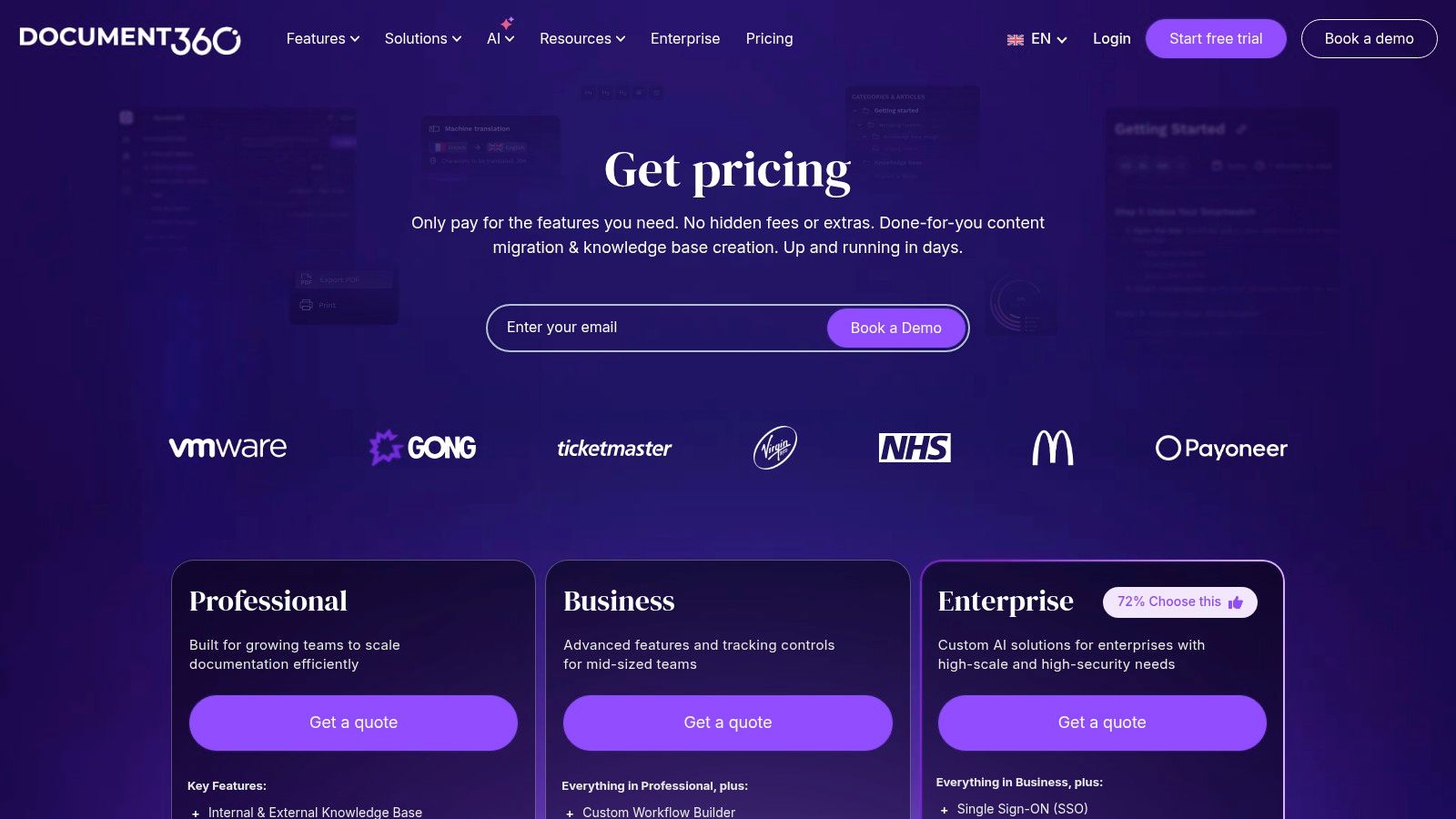
The platform allows you to create highly customized and branded knowledge portals using your own domain. It also provides granular access controls, ensuring that internal SOPs remain separate from public-facing guides. For global teams or international customer bases, its auto-translate feature, supporting over 50 languages, is a significant advantage, ensuring process consistency across different regions.
Key Details & Use Cases
Best For: SaaS companies building customer help centers, enterprises standardizing global SOPs, and organizations needing a single platform for both internal and external knowledge.
Key Features: Internal/external/mixed knowledge base configurations, custom domain and branding, auto-translation, version control, SOC 2 compliance, and robust import tools.
Pricing: A free plan is available for up to 5 team members. The Standard plan starts at $149/project/month. Higher-tier plans like Professional, Business, and Enterprise require a custom quote.
Pros: Excellent for managing both customer-facing and internal documentation in one place. Offers enterprise-grade security, scalability, and strong product momentum.
Cons: Pricing for most tiers is sales-assisted, making it less transparent. It is a more robust, heavier platform compared to lightweight, step-recorder tools.
For more details, visit Document360's pricing page.
11. GitBook
GitBook transforms process documentation into a polished, developer-friendly knowledge base. It excels at creating modern, public-facing or internal documentation sites for SOPs, runbooks, and product guides. By leveraging a block-based editor with Git synchronization, it appeals to technical teams who prefer a structured, version-controlled authoring experience, making it a powerful piece of software for process documentation for engineering and product-led organizations.
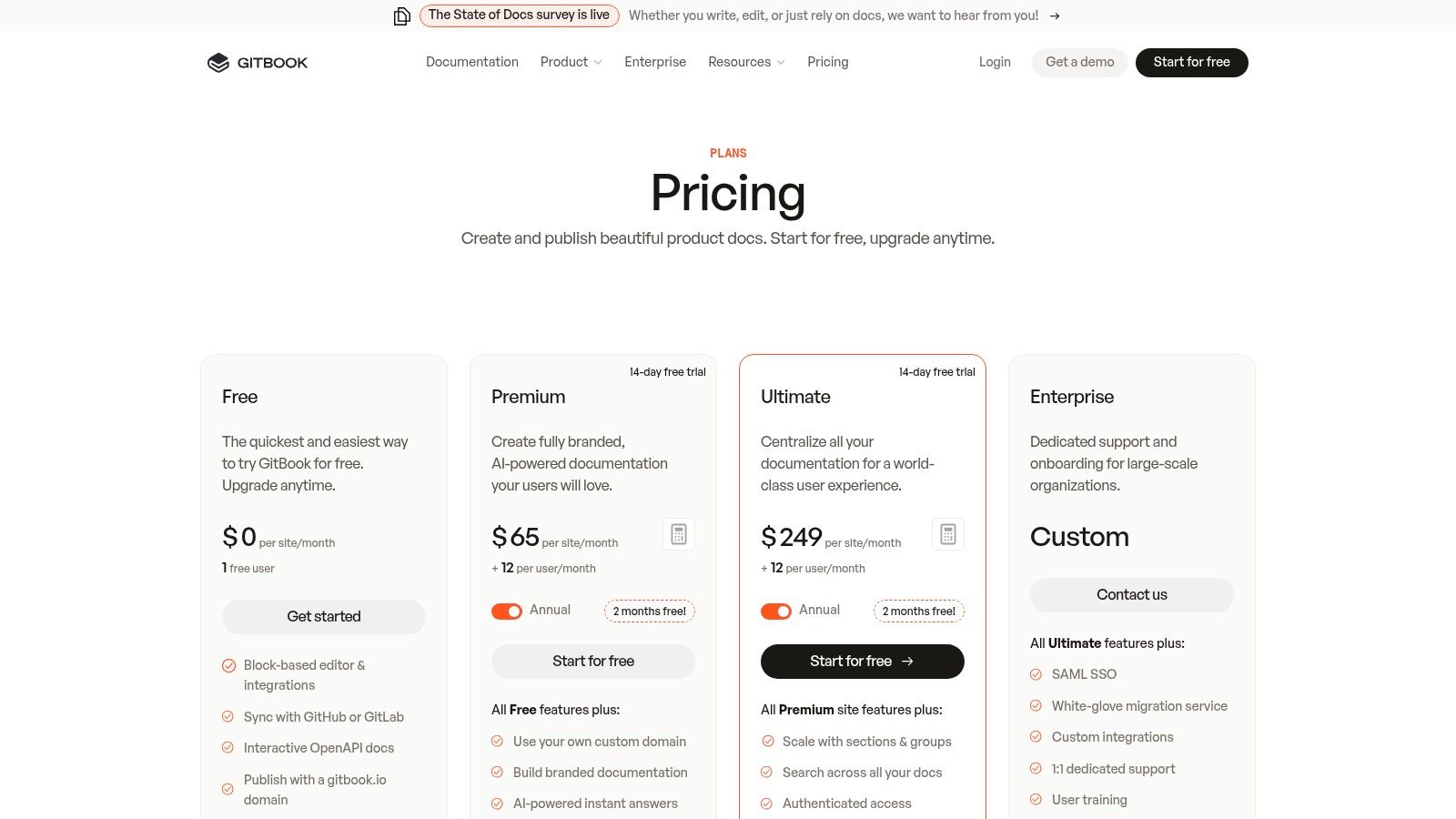
The platform is designed for creating structured, easy-to-navigate content that can be published as a professional-looking website. Features like custom domains, branding, and site insights allow teams to build a centralized hub for all their procedural knowledge. Its AI-powered search and answer capabilities make information highly discoverable for users.
Key Details & Use Cases
Best For: Engineering teams documenting technical runbooks, product teams creating public help centers, and organizations needing a polished internal knowledge base.
Key Features: Block editor with GitHub/GitLab sync, custom domains and branding, AI-powered answers, site analytics, and authenticated/private documentation options.
Pricing: A free plan is available for personal projects. The Plus plan starts at $6.40/user/month for small teams, and the Pro plan (starting at $12/user/month) adds custom domains and more integrations. Enterprise plans offer advanced security and support.
Pros: Creates beautiful, professional documentation sites for internal or external audiences. Scales effectively from a single knowledge base to a multi-site organization.
Cons: Not optimized for automatically capturing on-screen workflows like other tools. Its pricing model, which combines per-site and per-user fees, can become complex and requires careful planning.
For more details, visit GitBook's pricing page.
12. G2 (Standard Operating Procedures category)
G2 is not a documentation tool itself, but rather a B2B software marketplace that serves as an essential starting point for your research. Its dedicated category for Standard Operating Procedures (SOP) software aggregates dozens of vendors, providing a comprehensive overview of the market. This platform is an indispensable resource for finding and comparing different types of software for process documentation based on extensive user reviews, feature sets, and market presence.
Instead of relying solely on vendor marketing, you can leverage G2’s Grid Reports and real-world user feedback to create a shortlist of potential solutions. The platform allows you to filter options by business size, user satisfaction ratings, and specific features, ensuring you focus on tools that genuinely align with your operational needs and budget. It helps you discover lesser-known but highly-rated alternatives you might otherwise miss.
Key Details & Use Cases
Best For: Operations managers and IT leaders evaluating the market, consultants researching tools for clients, and any team wanting an unbiased view of available SOP solutions.
Key Features: Verified user reviews, Grid Reports for market comparisons, detailed feature filtering, and direct links to vendor websites and free trials.
Pricing: Free to browse and use for software discovery and reviews. Vendors pay for enhanced profiles and lead generation.
Pros: Saves significant time in the discovery phase by centralizing options. User reviews offer authentic insights that help balance vendor claims.
Cons: Sponsored placements can influence which tools appear most prominently. Ratings are aggregated, so a tool’s current fit should always be verified with a trial.
For more details, visit G2's Standard Operating Procedures category.
Top 12 Process Documentation Tools Comparison
Product | Core features ✨ | UX / Quality ★ | Value & Pricing 💰 | Target audience 👥 |
|---|---|---|---|---|
🏆 Build a Guide | ✨ AI video→guide; auto screenshots & callouts; rich editor; branded multi-hubs | 4.5★ — polished, editable, real-time collaboration & analytics | 💰 Start Free; paid tiers for teams & agencies; enterprise options | 👥 Agencies, CS/support, ops/HR, SaaS teams, SMBs |
Scribe | ✨ One-click capture; auto text & screenshots; exports & redaction | 4★ — very fast, low learning curve | 💰 Free tier; team plans; enterprise SSO | 👥 Docs creators, onboarding & support teams |
Tango | ✨ Auto-capture (desktop+browser); version history; analytics; on-screen walkthroughs | 4★ — clean, actionable outputs | 💰 Free limited plan; per-seat pricing; enterprise tier | 👥 Product/support teams, enterprises |
Process Street | ✨ SOP pages + checklist runs, approvals, automations | 4★ — strong run tracking & governance | 💰 Sales-assisted pricing; built for recurring workflows | 👥 Ops, compliance, mid–large teams |
SweetProcess | ✨ Procedures, policies, checklists; version history & exports | 3.5★ — straightforward, predictable UX | 💰 Predictable base pricing (active-member billing); 30‑day guarantee | 👥 Small–mid teams wanting simple SOPs |
Trainual | ✨ Docs + training paths, tests, attestations & reporting | 4★ — training-first; clear accountability | 💰 Annual commitment; seat bundles; possible implementation fee | 👥 SMBs scaling onboarding & ops |
Notion | ✨ Flexible pages & DBs; Notion AI; sites & API | 4★ — extremely flexible but needs governance | 💰 Competitive per-seat pricing; generous features | 👥 Teams wanting customizable SOP libraries |
Atlassian Confluence | ✨ Enterprise wiki, templates, automations, SSO | 3.5★ — mature governance; can feel heavy | 💰 Tiered pricing; Premium for advanced automation | 👥 Large orgs, Jira-heavy teams |
Guru | ✨ Verified KB, AI search/agents, 100+ integrations, enterprise security | 4★ — excels at in‑flow answers & verification | 💰 Per-seat pricing; AI credit limits | 👥 Support, sales, knowledge-centric enterprises |
Document360 | ✨ Internal/external KB; translations; custom domain; SOC 2 | 4★ — enterprise-grade KB & multilingual support | 💰 Sales-assisted tiers; enterprise-focused | 👥 Customer-facing KBs, enterprises |
GitBook | ✨ Modern docs; Git/GitHub sync; OpenAPI support; custom domains | 4★ — polished publishing for docs/sites | 💰 Mix of per-site & per-user pricing | 👥 Dev/product teams publishing docs |
G2 (SOP category) | ✨ Marketplace with rankings, reviews & filters to shortlist vendors | 4★ — valuable discovery & social proof | 💰 Free to browse; sponsored placements affect visibility | 👥 Buyers researching SOP software |
From Chaos to Clarity: Making Your Final Decision
Navigating the landscape of software for process documentation can feel overwhelming, but the journey from operational chaos to institutional clarity is a critical one. Undocumented, inconsistent processes are more than just a minor inconvenience; they are silent anchors dragging down productivity, hindering scalability, and creating frustrating bottlenecks for your team and clients. The core challenge is bridging the gap between how work should be done and how it is done, and as we've explored, the right software is the key to building that bridge.
This article has walked you through a curated selection of tools, each with its unique strengths. We've seen how different platforms cater to distinct needs, from internal knowledge management to client-facing training materials.
Recapping the Tool Categories
To simplify your choice, let's revisit the main categories of solutions we've covered:
Automated Capture Tools (Scribe, Tango): These are masters of speed, ideal for generating step-by-step guides from your screen activity in seconds. They excel at quickly documenting internal digital workflows where efficiency is paramount.
Checklist-Based Process Management (Process Street, SweetProcess): These platforms are built for accountability and repeatability. They shine when you need to enforce a strict sequence of tasks, track completions, and ensure no step is missed, making them perfect for operations, HR, and compliance-driven workflows.
Comprehensive Knowledge Bases (Notion, Confluence, Guru, Document360): These are the central libraries for your organization's collective intelligence. They are designed to store, organize, and retrieve vast amounts of information, from high-level policies to detailed project plans.
Developer-Focused Documentation (GitBook): This tool is tailored for technical teams that need to create and maintain robust product documentation, APIs, and internal technical knowledge bases with a workflow that developers understand and appreciate.
Making the right selection requires a clear understanding of not just what you need to document, but who the documentation is for and how it will be consumed. For those exploring a more technical or self-hosted route, looking into the Top 12 Documentation Management System Open Source Solutions can offer additional perspective on building a system from the ground up.
The Best Choice for Polished, Client-Ready Guides: Build a Guide
While every tool has its place, a specific need often emerges for agencies, consultants, and customer-facing teams: the ability to create visually stunning, professionally branded, and easily digestible guides from existing workflows without spending hours on formatting. This is precisely where Build a Guide distinguishes itself from the pack.
It stands out by uniquely combining the speed of AI-powered generation with the polish of a high-end publishing platform. Its core differentiator is the ability to transform your existing screen recordings, a common asset many teams already have, into structured, interactive, and beautifully designed guides. This video-to-guide workflow is a game-changer for teams that value both speed and professional presentation.
Instead of just capturing raw clicks, Build a Guide empowers you to create a premium deliverable. For agencies delivering SOPs to clients, or customer success teams onboarding new users, the ability to publish guides to a custom-branded, shareable hub elevates the final product from a simple document to a true operational asset. This focus on the end-user experience, combined with features designed for collaboration and brand consistency, makes it the ideal software for process documentation when the final impression matters most.
Ultimately, the goal is to transform your scattered tribal knowledge into an accessible, scalable, and powerful resource. Your choice of software will define how effectively you achieve that transformation.
Ready to turn your screen recordings into professional, client-ready documentation? Build a Guide helps you create beautiful, interactive guides in minutes using AI, so you can deliver polished SOPs and training materials that impress. Stop wrestling with formatting and start building your library of operational excellence today.