
February 10, 2026
Best Practices for Knowledge Management: A Guide to Boost Team Performance
Discover best practices for knowledge management: centralize information, boost collaboration, and measure impact with practical tips for 2026.
Information is everywhere, but actionable knowledge is scarce. In today's fast-paced environment, relying on outdated wikis, scattered documents, and 'tribal knowledge' creates friction, slows down onboarding, and leads to costly mistakes. The difference between struggling and scaling lies in a deliberate, modern approach to capturing and sharing how work gets done. A disorganized system means your team spends more time searching for answers than solving problems, directly impacting productivity and customer satisfaction.
This guide moves beyond generic advice to deliver 10 specific, battle-tested best practices for knowledge management tailored for dynamic teams. We'll explore how to transform chaotic information into a reliable 'single source of truth' that empowers agencies, customer success, HR, and product teams to operate with clarity and consistency. Moving past a simple repository of files is crucial; the goal is to create a living playbook that actively supports daily workflows and strategic goals.
Forget high-level theory. Each practice is broken down into actionable steps, key metrics, common pitfalls to avoid, and real-world examples. You will learn not just what to do, but how to implement these strategies effectively. Whether you are standardizing processes for clients, onboarding new hires, or creating customer-facing guides, these insights will help you build a robust knowledge management framework that drives tangible business results and gives your team the confidence to execute flawlessly.
1. Centralize Knowledge in a Single Source of Truth
Establishing a single source of truth (SSoT) is the foundational step in effective knowledge management. It involves consolidating all critical company information, from standard operating procedures (SOPs) and training materials to project workflows and HR policies, into one centrally managed, easily accessible repository. This practice eliminates information silos, where knowledge is trapped within specific teams or individuals, preventing confusion and ensuring everyone works from the most current and accurate data.
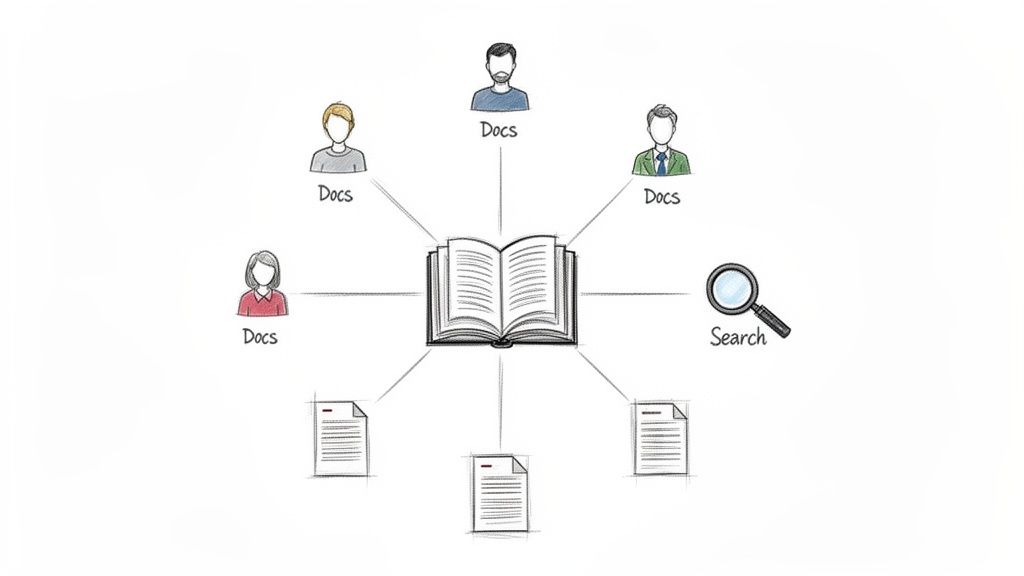
Without an SSoT, teams waste valuable time searching for information across scattered platforms like Google Drive, Slack channels, and personal inboxes, often finding conflicting or outdated versions. A centralized system ensures consistency and streamlines operations, making it one of the most impactful best practices for knowledge management you can implement.
Why It Matters
A single source of truth directly impacts efficiency and decision-making. Customer support teams can resolve tickets faster with immediate access to a unified product guide, while operations managers can onboard new hires consistently using standardized documentation. For agencies, a branded knowledge hub built with a tool like Build a Guide ensures clients receive clear, authoritative instructions, reducing back-and-forth communication.
How to Implement It
Select a Central Platform: Choose a tool that fits your team's workflow. This could be a dedicated wiki (like Notion or Confluence), a document management system, or a specialized guide-building platform. For organizations managing extensive digital files, exploring various Asset Manager Software Solutions can provide the necessary infrastructure to keep media and documents organized.
Assign Ownership: Designate a knowledge manager or a small team responsible for overseeing the platform, maintaining content quality, and ensuring organization-wide adoption.
Migrate and Organize: Systematically move existing documentation into the new SSoT. Use a clear taxonomy with tags, categories, and folders to make information easily discoverable.
Establish Governance: Create clear guidelines for content creation, updates, and archival. Implement a regular review schedule (e.g., quarterly) to audit and refresh documentation. If you need a framework, you can learn more about how to structure and build a knowledge base from scratch.
Integrate and Promote: Connect your SSoT with tools your teams use daily, like Slack or your project management software, to encourage usage and make accessing knowledge a seamless part of their workflow.
2. Document Processes with Visual Aids and Step-by-Step Instructions
Transforming complex workflows into visual, easy-to-follow guides dramatically improves comprehension and retention. This best practice for knowledge management involves combining screenshots, annotations, video demonstrations, and numbered steps to make procedures accessible to users with varying technical skills and learning preferences. A text-only document explaining a software workflow can be easily misinterpreted, but a visual guide leaves little room for error.

This method moves beyond static SOPs to create dynamic, engaging learning experiences. Instead of reading dense paragraphs, team members and clients can see exactly where to click and what to expect, reducing ambiguity and accelerating task completion. For example, a support team can resolve issues faster by sending customers a visual guide instead of typing out lengthy instructions.
Why It Matters
Visual documentation directly reduces errors, shortens training time, and improves user confidence. For agencies using a tool like Build a Guide, delivering annotated, step-by-step instructions for a new system helps clients adopt it quickly and with fewer support requests. Operations teams can ensure new hires follow processes like expense reporting correctly from day one, while product teams can reduce friction by embedding video walkthroughs directly into their user onboarding flow.
How to Implement It
Choose the Right Format: Use screenshots with annotations for simple UI-based tasks. For multi-step processes or dynamic workflows, record a short screen-capture video. Embedded videos are especially effective for complex demonstrations.
Break Down the Process: Deconstruct each workflow into small, logical steps. Aim for a single, clear action per step to prevent overwhelming the user. Highlight common mistakes and explicitly show how to avoid them.
Use Consistent Visual Language: Maintain a consistent style for annotations, highlights, and callouts across all your guides. This builds familiarity and makes your knowledge base look professional and cohesive.
Gather Feedback and Iterate: Test your guides with new users who are unfamiliar with the process. Watch where they get stuck or confused, then use that feedback to refine the visuals and clarify instructions.
Keep Visuals Current: Software interfaces change. Schedule regular reviews to update screenshots and re-record videos when a UI is updated, ensuring your documentation remains accurate and trustworthy. For a complete walkthrough, you can learn how to create a step-by-step guide with modern tools.
3. Implement Version Control and Documentation Lifecycle Management
A single source of truth is powerful, but its value diminishes if the information within it is outdated or untrustworthy. Implementing version control and a documentation lifecycle is a critical best practice for knowledge management that ensures accuracy. This practice involves tracking changes, maintaining a clear revision history, and establishing formal processes for creating, reviewing, approving, and eventually archiving content.
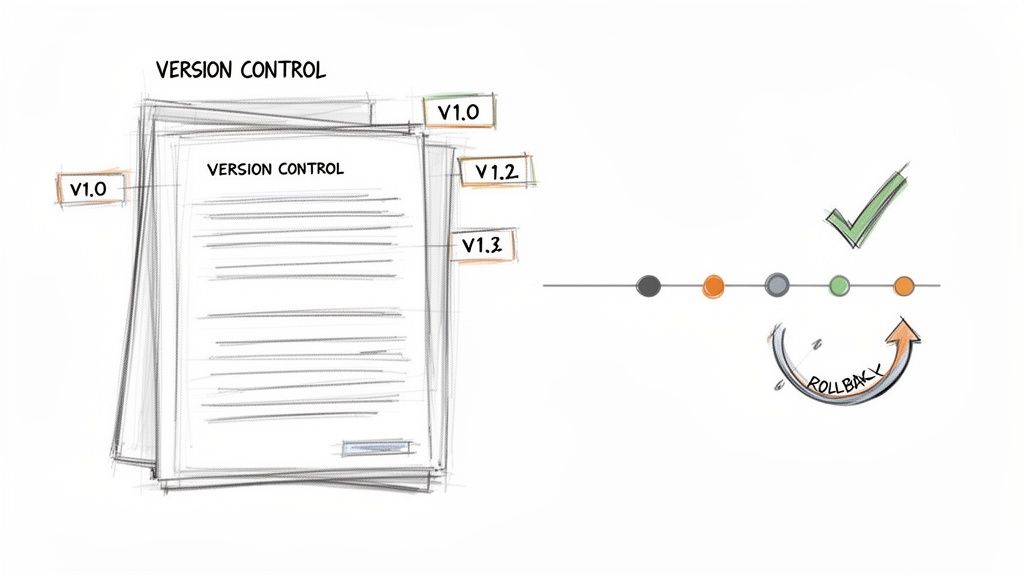
Without proper lifecycle management, teams risk using incorrect procedures, leading to errors, compliance issues, and wasted effort. For example, a support agent might follow an obsolete troubleshooting guide, or a new hire could be trained on a retired workflow. A systematic approach to content updates guarantees that everyone is always working with the approved, current version.
Why It Matters
Effective version control directly impacts operational integrity and consistency. For product teams, it means developers are always referencing the latest feature specifications, preventing costly rework. For HR and operations, it ensures that all employees adhere to the most current company policies, mitigating compliance risks. When an agency delivers a client guide using a tool like Build a Guide, version control allows them to roll out updates seamlessly, ensuring the client always has access to the latest instructions without confusion.
How to Implement It
Choose Tools with Versioning: Select a platform with built-in version history capabilities. Tools like Confluence, Google Docs, and GitHub excel at this, allowing users to see what changed, when, and by whom.
Define a Content Lifecycle: Map out the stages for your documentation: Draft, In Review, Approved/Published, and Archived. Assign clear owners for the review and approval stages.
Establish Clear Naming Conventions: Use a consistent versioning system, such as semantic versioning (e.g., v1.0, v1.1, v2.0) or simple date-based versions (e.g., 2024-Q3-Update). Require meaningful comments for each update to explain the "why" behind the change.
Set Up Automated Review Reminders: For evergreen content like SOPs and policies, schedule periodic reviews (e.g., every six or 12 months) to ensure they remain accurate. For tips on managing this efficiently, discover how to keep SOPs up to date without a meeting.
Archive, Don't Delete: When a document becomes obsolete, move it to a designated archive instead of deleting it. This preserves historical context and can be valuable for future audits or reference.
4. Create Role-Based and Audience-Specific Documentation
One-size-fits-all documentation often fails because it doesn't address the specific needs, technical skills, or goals of different audiences. Creating role-based and audience-specific content is a crucial best practice for knowledge management that ensures information is not just available, but also relevant and digestible for each user. This involves tailoring content for different personas, such as providing a high-level overview for executives, detailed technical steps for developers, and simplified guides for end-users.
This approach acknowledges that a customer support agent, a new hire in HR, and a senior engineer all require different information from the same system or process. By segmenting documentation, you dramatically increase its usability and adoption, preventing users from being overwhelmed by irrelevant details or confused by technical jargon.
Why It Matters
Tailored documentation directly boosts comprehension and efficiency. For example, a customer-facing guide built with a tool like Build a Guide can offer a simplified, non-technical walkthrough, reducing support tickets and improving user satisfaction. Meanwhile, an internal version of the same guide for support teams can include advanced troubleshooting steps and escalation protocols. This segmentation ensures everyone gets precisely the information they need to perform their role effectively.
How to Implement It
Identify Key User Personas: Start by defining your primary audiences. Common personas include new hires, customer support agents, technical administrators, and external clients.
Map Information Needs: For each persona, outline what they need to know, what their goals are, and what level of technical detail is appropriate. An administrator needs to know system settings, while an end-user only needs to know how to perform daily tasks.
Structure and Label Content: Create distinct versions or sections of your documentation for each role. Clearly label guides (e.g., "Admin Guide," "User Quick-Start") so people can easily find the right content.
Implement Access Controls: For sensitive information, use your knowledge base to restrict access to certain content. This requires a clear access control policy to ensure that users only see the information relevant and permitted for their role.
Gather Feedback and Iterate: Test your role-specific documentation with actual users from each group. Use their feedback to refine the content, clarity, and structure to better meet their needs.
5. Establish a Documentation Review and Feedback Loop
Static documentation quickly becomes outdated and irrelevant. Establishing a systematic review and feedback loop transforms your knowledge base from a passive repository into a living, evolving resource. This practice involves creating clear channels for users to report inaccuracies, ask questions, and suggest improvements, then formalizing a process to review, update, and validate content regularly.
A continuous feedback cycle ensures that your knowledge management system remains accurate, useful, and aligned with the real-world needs of its users. Without it, trust in the documentation erodes, leading teams to create their own workarounds and resurrecting the very information silos you sought to eliminate. This commitment to maintenance is a critical component of effective, long-term knowledge management.
Why It Matters
A robust feedback loop directly improves documentation quality and user adoption. For customer support teams, user-rated help articles (like those in Zendesk) quickly highlight confusing or unhelpful content, allowing for rapid improvements that reduce ticket volume. For operations managers, feedback from new hires on onboarding guides can pinpoint gaps in training materials, refining the process for future employees and accelerating their time to productivity.
How to Implement It
Integrate Frictionless Feedback Channels: Embed simple feedback mechanisms directly into your documentation. This can be a "Was this helpful?" button, a short comment form, or a direct link to a dedicated Slack channel for documentation suggestions.
Schedule Regular Content Audits: Assign owners to specific sections of your knowledge base and schedule quarterly or semi-annual reviews. During these audits, owners should verify accuracy, check for broken links, and update any outdated information.
Track and Analyze Feedback Trends: Use a simple spreadsheet or a project management tool to log all incoming feedback. Look for recurring themes that might indicate systemic issues with a process or a widespread misunderstanding of a product feature.
Create a Clear Triage Process: Designate who is responsible for reviewing incoming feedback and assigning it to the appropriate content owner for action. Set SLAs (Service Level Agreements) for acknowledging and resolving feedback to show users their input is valued.
Communicate Updates Proactively: When you update an article based on user feedback, notify the person who submitted it. This small step closes the loop, encourages future contributions, and builds a culture of shared ownership over the knowledge base.
6. Use Consistent Terminology and Standardized Language
Establishing standardized language is a crucial practice for ensuring clarity and preventing confusion across all organizational documentation. This involves creating a unified style guide or glossary that defines how to reference specific features, processes, and concepts. When everyone uses the same terms, information becomes significantly easier to find, understand, and act upon.
Inconsistent terminology creates "semantic silos," where different teams refer to the same concept by different names. A feature might be called the "user dashboard" by support, the "client portal" by sales, and the "main interface" by developers. This fractures understanding and makes searching for relevant information nearly impossible, undermining other best practices for knowledge management.
Why It Matters
Standardized language directly impacts user experience and internal efficiency. For customer support teams, using consistent feature names ensures they provide clear, unambiguous instructions to users. For operations, it means an onboarding process documented as "New Hire Setup" is never confused with a legacy "Employee Integration" workflow. Agencies using a tool like Build a Guide can create a branded glossary for clients, ensuring their instructions on using a new system are perfectly clear and professional.
How to Implement It
Form a Language Committee: Involve documentation writers, subject matter experts from various departments (like product and support), and a designated editor to create the initial style guide and glossary.
Define Core Terms: Start by documenting the most critical and frequently used terms. Define what they mean, when to use them, and provide examples of correct and incorrect usage. Include rationale for key decisions.
Create and Distribute a Style Guide: House your terminology rules in a central, easily accessible location within your knowledge base. This guide should cover everything from product feature names to tone of voice and formatting.
Train and Enforce: Onboard all new and existing employees who create documentation on how to use the style guide. Make adherence a part of the content review and approval process.
Audit and Update Regularly: Language evolves. Schedule periodic reviews of your documentation to find and correct non-standard usage and update the glossary with new terms as your products or processes change.
7. Make Knowledge Management Mobile-Accessible and Offline-Capable
In today's distributed work environment, knowledge must be accessible anytime, anywhere. Making your knowledge management system mobile-friendly and available offline transforms it from a static office resource into a dynamic tool for field teams, frequent travelers, and employees with unreliable internet access. This practice ensures that crucial information like SOPs and troubleshooting guides is always within reach, regardless of location or connectivity.
Without mobile and offline capabilities, your knowledge base becomes useless the moment an employee steps away from their desk. A field technician can't access a repair guide on-site, and a remote team member can't review project documents during a commute. Adopting a mobile-first approach is a critical best practice for knowledge management that supports a modern, flexible workforce.
Why It Matters
Mobile and offline access directly boosts productivity and operational resilience. For an agency, a project manager can review client requirements on their tablet just before a meeting, even if the coffee shop has spotty Wi-Fi. A customer support agent working from home can download key product guides, ensuring they can assist customers even during an internet outage. Using a tool like Build a Guide, you can create responsive guides that look great on any device, ensuring clients can access their deliverables seamlessly.
How to Implement It
Choose a Mobile-First Platform: Select a knowledge base tool with a robust mobile app or a fully responsive web design. Platforms like Notion, Confluence, and Slack offer excellent mobile experiences.
Optimize Content for Small Screens: Design documentation with mobile users in mind. Use single-column layouts, large fonts, and collapsible sections (accordions) to make information easy to read and navigate on a phone.
Enable Offline Access: Configure your system to allow users to download or sync key documents for offline use. This could involve enabling PDF downloads, using a platform with native offline capabilities, or considering a Progressive Web App (PWA) for an app-like experience.
Compress Media Files: Optimize images and videos to reduce file sizes. This ensures faster loading times on mobile networks and minimizes the storage space required for offline content.
Test Across Devices: Regularly test how your knowledge base performs on various smartphones and tablets. Check for readability, navigation issues, and functionality to ensure a consistent and positive user experience for everyone.
8. Integrate Knowledge Management with Existing Workflow Tools
Effective knowledge management shouldn't require teams to constantly switch contexts or leave the applications where they do their work. Integrating your knowledge base directly into existing workflow tools like Slack, your CRM, or help desk software embeds information where it’s needed most. This practice transforms knowledge from a destination to a utility, surfacing answers and documentation contextually and frictionlessly.
Instead of forcing employees to remember to check the knowledge base, integrations bring the knowledge base to them. This approach dramatically increases adoption and ensures that your carefully curated documentation is actually used, making it one of the most practical best practices for knowledge management.
Why It Matters
Integrating knowledge tools directly reduces friction and saves significant time. A support agent can pull up a relevant help article directly within Zendesk or Intercom without leaving the ticket, leading to faster resolution times. Similarly, a sales team can access product documentation or sales scripts from within their CRM like Salesforce or HubSpot, ensuring they have accurate information during client calls. This seamless access boosts productivity and promotes consistent, informed work across all departments.
How to Implement It
Identify Key Platforms: Map out the core tools your teams use daily. Common candidates include communication apps (Slack, Microsoft Teams), help desks (Zendesk, Intercom), and CRMs (Salesforce, HubSpot).
Explore Native Integrations and APIs: Check if your knowledge base platform offers pre-built connections with these tools. If not, use APIs or webhooks to create custom integrations that sync information or enable search functionality.
Embed Knowledge Contextually: Configure integrations to surface relevant information automatically. For example, set up a Slack bot that suggests relevant articles when specific keywords are mentioned in a channel. For client-facing guides created with a tool like Build a Guide, use its sharing features to embed guides directly into project management boards or client portals.
Enable In-App Search: Implement functionality that allows users to search the entire knowledge base without leaving their primary application. This is a critical feature for reducing context-switching.
Train and Promote: Announce the new integrations and provide clear instructions on how to use them. Highlight the time-saving benefits to encourage adoption and gather feedback for improvements.
9. Measure Knowledge Management Impact Through Metrics and Analytics
To prove the value of your knowledge management efforts, you must move beyond simply creating documentation and start measuring its impact. This practice involves establishing key performance indicators (KPIs) to track how your knowledge base contributes to tangible business outcomes. By monitoring metrics like documentation usage, support ticket reduction, and user satisfaction, you can demonstrate ROI and continuously refine your strategy.

Without data, your knowledge management system is just a collection of documents with no clear purpose. Analytics transform it into a strategic asset, providing insights to optimize content, improve user experience, and align with company goals. This data-driven approach is one of the most critical best practices for knowledge management, as it justifies investment and ensures long-term success.
Why It Matters
Measuring impact connects your knowledge base directly to business value. For a customer support team, tracking a decrease in ticket volume after publishing a detailed FAQ guide proves the guide's effectiveness and cost savings. An operations team can measure reduced onboarding time by analyzing how quickly new hires complete training guides, directly impacting productivity. For an agency using a tool like Build a Guide, analytics on client guide views can confirm that customers are successfully self-serving, leading to higher satisfaction.
How to Implement It
Define Success Metrics: Before launching, establish clear KPIs. These could be quantitative (e.g., 20% reduction in support tickets, 15% faster onboarding) or qualitative (e.g., improved employee confidence score).
Choose Your Analytics Tools: Integrate analytics platforms to track usage. This might include Google Analytics for a public knowledge base, Pendo for in-app guide engagement, or the built-in analytics within your knowledge management software.
Track Leading and Lagging Indicators: Monitor leading indicators like page views, search queries, and time on page to gauge engagement. Correlate these with lagging indicators like ticket deflection rates, customer satisfaction (CSAT) scores, or employee performance to measure ultimate impact.
Create Dashboards: Set up a centralized dashboard to visualize your key metrics in real-time. This provides stakeholders with immediate visibility into the performance of your knowledge initiatives.
Review and Iterate: Schedule regular reviews (e.g., monthly or quarterly) to analyze the data. Use insights to identify underperforming articles, popular topics, and content gaps, then act on this information to continuously improve your knowledge base.
10. Foster a Knowledge-Sharing Culture Through Incentives and Social Learning
A sophisticated knowledge base is useless if no one contributes to it. Fostering a knowledge-sharing culture shifts documentation from a top-down mandate to a collective, bottom-up responsibility. This involves creating an environment where sharing expertise is recognized, rewarded, and integrated into the natural flow of work, ensuring your knowledge base grows organically and stays relevant.
Without this cultural foundation, documentation quickly becomes outdated, and subject matter experts remain untapped resources. This practice transforms knowledge management from a simple storage system into a dynamic, living ecosystem. By incentivizing contributions and facilitating peer-to-peer learning, you embed one of the most sustainable best practices for knowledge management into your company's DNA.
Why It Matters
A strong knowledge-sharing culture directly boosts engagement, innovation, and resilience. When a product team member is celebrated for documenting a new feature workflow, it encourages others to do the same, improving cross-functional collaboration. For agencies, recognizing a consultant who creates a client-facing guide with a tool like Build a Guide not only improves service delivery but also builds a library of reusable assets for the entire team. This culture reduces knowledge hoarding and minimizes the risk of losing critical information when an employee leaves.
How to Implement It
Introduce Meaningful Incentives: Offer recognition or rewards for valuable contributions. This can range from public praise in a company-wide meeting and "Knowledge Champion" awards to small bonuses or gift cards.
Gamify the Process: Implement a points or badging system, similar to Stack Overflow's reputation model, where employees earn recognition for asking good questions, providing quality answers, or authoring new documentation.
Facilitate Social Learning: Create channels (e.g., dedicated Slack channels, lunch-and-learn sessions) where team members can share insights and learn from one another. This makes knowledge sharing a collaborative, social activity rather than an isolated task.
Incorporate into Performance Reviews: Formally include knowledge-sharing activities in performance evaluations and career development plans. This signals that the organization genuinely values these contributions.
Lead by Example: Encourage senior leaders and managers to actively participate in the knowledge base. When leaders model the desired behavior, it reinforces its importance throughout the organization.
10 Knowledge Management Best Practices Comparison
Practice | 🔄 Implementation complexity | ⚡ Resource requirements | 📊 / ⭐ Expected outcomes & effectiveness | 🎯 Ideal use cases | 💡 Key tips |
|---|---|---|---|---|---|
Centralize Knowledge in a Single Source of Truth | Moderate–High — consolidation, governance required | Moderate — platform, migration, ongoing maintenance | 📊 High — fewer conflicts, faster onboarding, improved compliance ⭐⭐⭐⭐ | Distributed teams, compliance-heavy orgs, multi-department coordination | Assign a knowledge manager; use clear taxonomy and integrations |
Document Processes with Visual Aids and Step-by-Step Instructions | Moderate — capture and format visuals, maintain updates | Moderate–High — multimedia creation, storage, editing tools | 📊 High — better comprehension, reduced training time ⭐⭐⭐⭐ | Onboarding, support guides, non-technical audiences | Use real interfaces; one action per step; update when UI changes |
Implement Version Control and Documentation Lifecycle Management | High — approval workflows and governance needed | Moderate — versioning tools and contributor training | 📊 High — prevents outdated info, auditability, rollback ⭐⭐⭐⭐ | Regulated industries, collaborative editing, large orgs | Define approval chains; use meaningful versions; archive old docs |
Create Role-Based and Audience-Specific Documentation | Moderate — content branching and templates to manage | Moderate — multiple variants to create and maintain | 📊 Medium–High — increased adoption and targeted help ⭐⭐⭐ | Products with diverse personas, customer vs support documentation | Start with critical personas; clearly label audience and test guides |
Establish a Documentation Review and Feedback Loop | Low–Moderate — set processes for collection and review | Low–Moderate — analytics, reviewers, feedback tools | 📊 High — iterative quality gains and higher engagement ⭐⭐⭐⭐ | Fast-changing products, user-driven improvement programs | Make feedback frictionless; act on trends and share updates |
Use Consistent Terminology and Standardized Language | Moderate — develop and enforce a style/term guide | Low–Moderate — SME input and editorial effort | 📊 High — better searchability, cohesion, easier localization ⭐⭐⭐⭐ | Large documentation sets, multi-author environments, localization | Involve SMEs; document rationale; audit regularly |
Make Knowledge Management Mobile-Accessible and Offline-Capable | Moderate–High — responsive design and sync logic | High — development, testing, offline infrastructure | 📊 Medium–High — greater accessibility for field teams ⭐⭐⭐ | Field operations, remote workers, low-connectivity contexts | Optimize assets for mobile; provide downloadable PDFs |
Integrate Knowledge Management with Existing Workflow Tools | High — API work, plugins, contextual connections | High — engineering and maintenance effort | 📊 High — reduces context switching, increases usage ⭐⭐⭐⭐ | Support desks, CRMs, in-app help, collaboration platforms | Start with most-used tools; implement search in integrations |
Measure Knowledge Management Impact Through Metrics and Analytics | Moderate — instrumentation and dashboarding | Moderate–High — analytics tools, data processes, privacy | 📊 High — demonstrates ROI, guides prioritization ⭐⭐⭐⭐ | Programs requiring ROI proof, continuous optimization | Define success metrics up front; correlate docs with ticket trends |
Foster a Knowledge-Sharing Culture Through Incentives and Social Learning | High — cultural change, program design and governance | Moderate–High — recognition systems, moderation, rewards | 📊 High — increased contributions, reduced silos, ongoing updates ⭐⭐⭐⭐ | Organizations needing decentralized updates and expertise sharing | Start simple; recognize contributors; provide low-friction templates |
Turn Your Knowledge from an Archive into an Asset
Embarking on a knowledge management initiative can feel like a monumental task, but it doesn't have to be. As we've explored, the journey from scattered information to a powerful, centralized knowledge base is built on a series of deliberate, actionable steps. It's not about creating a static digital archive; it's about building a dynamic, living ecosystem that empowers every member of your team to perform at their best.
The core principle tying all ten best practices for knowledge management together is a shift in perspective. We must move from viewing documentation as a chore to seeing it as a strategic imperative for growth, efficiency, and consistency. Whether you are an agency standardizing client deliverables, an HR manager streamlining onboarding, or a support team aiming for first-contact resolution, the goal is the same: make the right information accessible to the right person at the right time.
From Theory to Action: Your Next Steps
The difference between a successful and a failed knowledge management strategy often comes down to momentum. To translate the insights from this article into tangible results, focus on a phased, manageable approach. Don't try to boil the ocean by documenting every single process at once.
Instead, start with these immediate actions:
Identify High-Impact Areas: Pinpoint one or two critical processes that are frequent pain points. Is it a complex client onboarding workflow? A multi-step technical support ticket? A new hire's first-week checklist?
Assemble Your Champions: You don't need a dedicated team at first. Identify individuals who are natural documenters or process experts and empower them to lead the initial effort. Their early success will create the social proof needed for wider adoption.
Choose the Right Tool for the Job: Select a platform that actively supports these best practices. Look for features that enable visual step-by-step guides, version control, role-based access, and seamless integration, rather than a generic text editor or wiki.
The true value of mastering these best practices for knowledge management extends far beyond simple process documentation. It’s about building organizational resilience. When knowledge is codified and accessible, your business is less vulnerable to employee turnover. You can scale operations without sacrificing quality, onboard new team members faster, and empower your staff with the autonomy to solve problems independently.
The Lasting Impact of a Knowledge-First Culture
Ultimately, a robust knowledge management system becomes the backbone of your organizational culture. It reinforces consistency, promotes collaboration, and demonstrates a commitment to excellence. When you implement a clear feedback loop, you tell your team their expertise matters. When you provide mobile-friendly guides, you show respect for their modern workflows. And when you measure the impact, you connect their documentation efforts directly to business outcomes.
This is how you transform knowledge from a dormant file on a server into your company’s most valuable, scalable asset. It’s the playbook that ensures every client receives the same high-quality service, every product question gets a consistent answer, and every employee has the confidence to execute their role flawlessly. Stop letting valuable expertise walk out the door at the end of the day. Start building a system that captures, refines, and amplifies it for years to come.
Ready to put these best practices into action with a tool designed for clarity and efficiency? Build a Guide helps you create beautiful, interactive, step-by-step guides that make complex processes simple and accessible for everyone. Stop wrestling with outdated wikis and start empowering your team today at Build a Guide.