
January 4, 2026
What Is Process Documentation? Guide to what is process documentation for teams
Discover what is process documentation and how to build clear SOPs that scale operations, boost consistency, and empower your team.
Process documentation is your company's official playbook for getting important work done right, every single time. It's the simple act of capturing exactly how a task gets done, turning scattered team knowledge into a reliable, shared resource that anyone can follow.
What Is Process Documentation, Really?
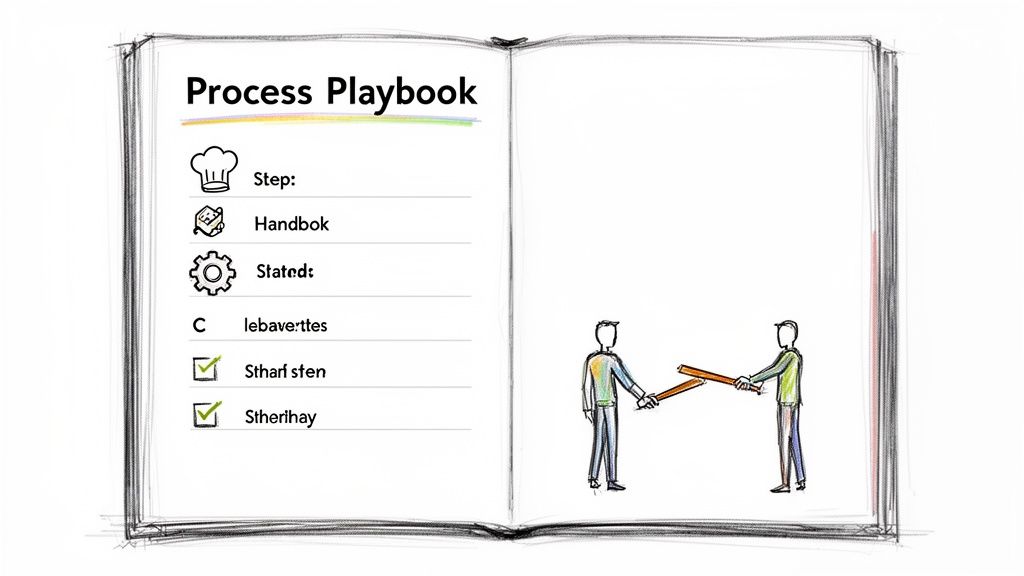
Imagine trying to bake a complex cake with no recipe. A few experienced bakers might pull it off from memory, but each cake would come out a little different. And a new baker? They’d be lost, leading to wasted ingredients and a lot of frustration.
Process documentation is that recipe for your business. It’s the official, step-by-step guide explaining how to complete a specific task from start to finish. This isn't just some dry, corporate chore; it's the foundational blueprint for building a scalable and efficient company.
Without it, you’re relying on "tribal knowledge"—where crucial information lives only in the minds of a few key people. This setup is incredibly fragile. The moment a key person goes on vacation or leaves the company, that knowledge walks out the door with them, often causing chaos, delays, and a dip in quality.
Process documentation transforms individual expertise into a durable company asset. It’s the difference between a business that relies on heroes and one that is built on a reliable system.
This systematic approach moves your team from guessing and improvising to executing with precision and confidence.
The Core Components of Your Playbook
Good process documentation isn't just a simple checklist. It’s a complete resource designed for clarity and action. While the formats can vary, the best guides always include a few key elements that work together to give the full picture.
Here's a quick look at the essential parts that make up a truly useful process document.
Component | Description | Primary Benefit |
|---|---|---|
Process Name | A clear, descriptive title. | Instantly tells the user what the guide is for. |
Purpose & Scope | A brief explanation of why the process exists. | Sets expectations and provides needed context. |
Roles & Responsibilities | Defines who is responsible for each step. | Eliminates confusion over ownership and approvals. |
Step-by-Step Instructions | The heart of the document, with clear actions. | Provides an actionable, easy-to-follow workflow. |
Required Tools & Resources | A list of all software, links, or templates needed. | Ensures the user has everything they need upfront. |
By including these components, you create a resource that doesn't just show team members what to do—it empowers them with the context they need to do it well.
The Real Value of Documenting Your Processes
Okay, so we know what process documentation is. But the real question is, why should you care?
The answer is simple: documenting your processes isn't just about writing things down. It's one of the highest-leverage activities you can do. It’s the engine that powers efficiency, consistency, and growth, turning tribal knowledge into a real competitive advantage.
Without it, you're operating on assumptions and word-of-mouth. This creates silent risks and drains that slowly kill productivity. Good documentation plugs those leaks and builds a reliable foundation for your whole team.
From Costly Errors to Consistent Quality
One of the first things you'll notice when you document your processes is a massive drop in preventable mistakes.
When team members have to guess or recall steps from memory, things get messy. A small deviation in one step can cause a flawed deliverable, a bad customer experience, or hours of rework. Standardized workflows get rid of that ambiguity completely.
Think about an agency running multiple client campaigns. A documented process guarantees every project kickoff follows the exact same quality-checked procedure. No missed steps, from the initial brief to the final delivery. The result is consistently great work that builds client trust and protects your reputation.
By standardizing the 'how,' you free up your team’s mental energy to focus on the 'what' and 'why'—delivering real value instead of reinventing the wheel every single time.
This shift from improvisation to precision is everything if you want to scale without quality taking a nosedive.
Accelerating Onboarding and Empowerment
How fast can a new hire become a productive, confident member of the team? With clear process documentation, the answer is much faster.
Instead of endless shoulder-tapping and shadowing, new employees get a self-serve resource that empowers them from day one. This can shrink the training cycle from weeks down to a matter of days.
This is a game-changer for remote and hybrid teams where you can’t just lean over and ask a question. A well-documented process gives people the clarity and autonomy they need to get work done, no matter where they are. It answers their questions before they even have to ask, which means less hand-holding and fewer managerial bottlenecks.
Cultivating a Culture of Improvement
Transparent, documented processes do more than just enforce rules; they invite people to make things better.
When a workflow is mapped out for everyone to see, the people on the front lines can easily spot inefficiencies, find bottlenecks, or suggest smarter ways to do things. Process improvement stops being a top-down mandate and becomes a collaborative, team-wide habit.
This isn't just a hunch; the market sees it too. The business process documentation tools market is expected to grow from $1.94 billion in 2024 to $2.16 billion in 2025. This growth is a direct response to the pain teams feel when poor documentation contributes to 27% of employee errors in complex tasks. It's clear that good guides lead to good outcomes. You can learn more about the market forces driving process documentation adoption.
At the end of the day, process documentation is an investment with real, tangible returns:
Increased Efficiency: Teams get work done faster with less time wasted on corrections or hunting for information.
Enhanced Quality Control: Consistency becomes the default, leading to more reliable work and happier customers.
Faster Growth: New team members get up to speed in record time, letting you scale your operations without the chaos.
Greater Agility: When a process needs to change, updating a single document is far easier than trying to retrain an entire organization by word-of-mouth.
Choosing the Right Type of Process Documentation
Just like a carpenter has different tools for different jobs, your team needs different types of documentation for different tasks. Picking the right format is the first step toward creating a resource people will actually use. If you get it wrong, you end up with a guide that's either confusing or completely ignored.
Think of it this way: you wouldn't hand someone a detailed blueprint to explain how to hammer a nail. And you wouldn't use a sticky note to outline how to build a house. The goal is to match the document's detail and structure to the specific need.
When you understand the strengths of each type, you build a knowledge base where every process has a guide that’s perfectly suited to its purpose.
Standard Operating Procedures (SOPs)
A Standard Operating Procedure (SOP) is your go-to for complex, multi-step processes that have to be done the exact same way every single time. It’s like a detailed recipe where every ingredient and action is listed in precise order to guarantee a consistent outcome.
SOPs are the backbone of quality control and consistent training. They're perfect for core business functions that are critical to your operations and have a very low tolerance for error.
Best For: Detailing high-stakes, repeatable processes.
Example Use Case: An SOP for deploying a new software update to a client's server. It would include pre-flight checks, deployment steps, and post-deployment validation to ensure no critical security or functional step is ever missed.
This kind of detailed documentation isn't just about getting work done; it's a strategic driver for the entire business.
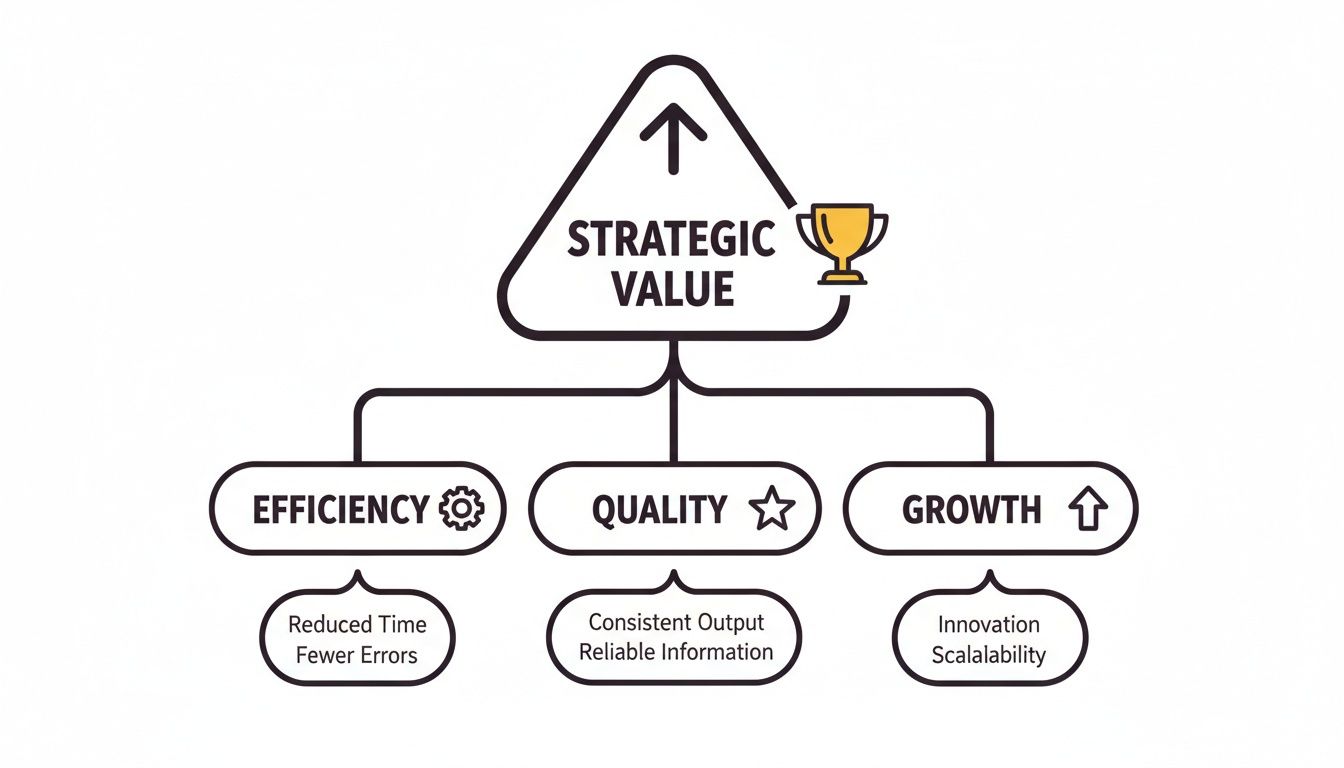
As you can see, documenting processes isn’t just an operational chore. It's a key driver for hitting top-level business goals.
Checklists and Process Maps
While SOPs offer deep detail, sometimes your team just needs a quick reminder or a high-level view. This is where checklists and process maps really shine.
A checklist is a simple memory aid. It's made for routine tasks where the person already knows how to do the work but needs to make sure they don't forget any crucial steps. It prioritizes completion over instruction.
On the other hand, a process map (often a flowchart) gives you a visual, big-picture overview of an entire workflow. It’s perfect for showing how different tasks and teams connect, illustrating decision points and dependencies without getting bogged down in the details of each step.
Use checklists to prevent errors in familiar tasks and process maps to understand the bigger picture. One ensures tactical precision, while the other provides strategic clarity.
Getting this distinction right is key to building a practical knowledge base that actually helps your team in their day-to-day work.
Runbooks and Emergency Guides
Finally, some processes aren't about routine operations—they’re about what to do when things go wrong. A runbook is your team's emergency guide for troubleshooting critical system failures or responding to incidents.
Unlike an SOP that outlines a standard procedure, a runbook is designed for high-pressure, non-standard situations. It provides diagnostic steps, potential fixes, and escalation rules for specific problems, like a server outage or a security breach.
Best For: Incident response and system troubleshooting.
Example Use Case: A runbook for when your e-commerce site goes down. It would include steps to check server status, analyze error logs, contact the hosting provider, and communicate the outage to customers.
Matching Documentation Type to Your Team's Needs
Picking the right format can feel tricky, but it boils down to matching the tool to the task. This table breaks down which type of documentation is best for different situations.
Documentation Type | Best For | Example Use Case | Key Feature |
|---|---|---|---|
SOP | Complex, high-stakes tasks that demand consistency. | Onboarding a new client to your software platform. | Step-by-step, prescriptive instructions. |
Checklist | Simple, repeatable tasks performed by experienced users. | Pre-flight check before sending a marketing email. | Quick, scannable memory aid. |
Process Map | Visualizing how a multi-part process flows and connects. | Mapping the entire customer journey from lead to renewal. | High-level, visual overview. |
Runbook | Responding to critical incidents and system failures. | Restoring a database from a backup after a crash. | Diagnostic and prescriptive for emergencies. |
In the end, choosing the right documentation format—whether it's a detailed SOP, a quick checklist, a visual map, or a critical runbook—ensures your team has the exact information they need, right when they need it most.
A Step-By-Step Guide to Creating Effective Documentation
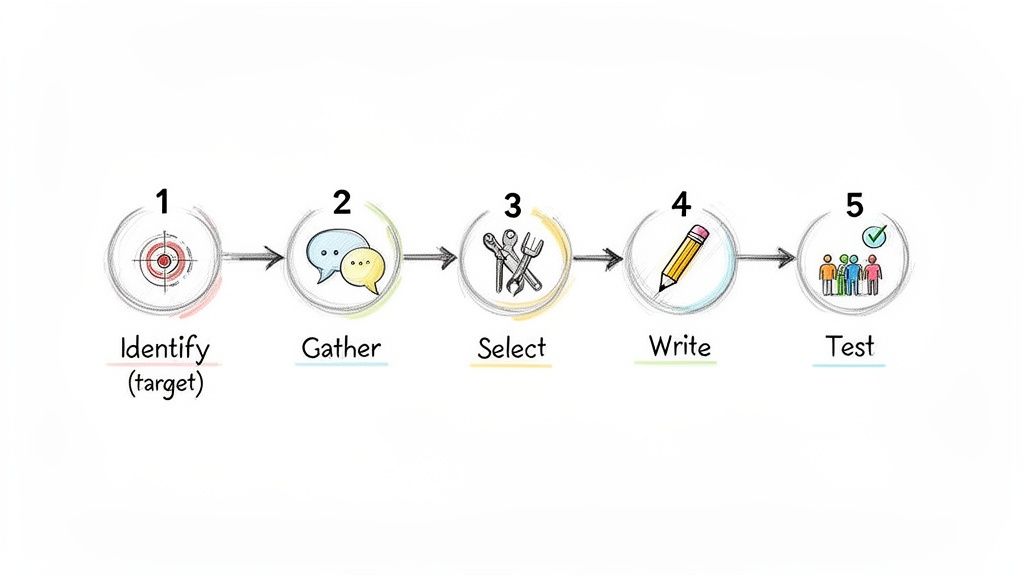
Knowing the what and why of process documentation is half the battle. The other half is actually creating guides your team will use and value. A great document isn't just written; it's engineered for clarity and action.
This practical, five-step roadmap will walk you through building documentation that solves real problems instead of gathering digital dust. Following this structure turns a daunting task into a manageable—and repeatable—workflow.
Step 1: Identify High-Impact Processes
Before you write a single word, figure out where to focus. You can’t document everything at once, so start where the pain is most acute.
Look for processes that are:
Frequently Performed: High-volume tasks are the biggest opportunity for efficiency gains.
Critical for New Hires: What does a new team member absolutely need to know to be productive? Onboarding guides are a huge win.
Prone to Errors: Where do mistakes happen most often? Good documentation here can dramatically improve quality and consistency.
By starting with these high-impact areas, you’ll show the value of process documentation quickly and build momentum for everything else.
Step 2: Gather Information from the Source
The best documentation reflects reality. The only way to capture that is by talking to the people who actually do the work. Your subject matter experts (SMEs) are the employees on the front lines, executing these tasks every single day.
Sit down with them. Watch them work. Ask them to walk you through the process step-by-step, explaining not just what they do but why they do it. This is where you uncover the unwritten rules and tiny details that make a process successful.
Step 3: Select the Right Format and Tools
With your information gathered, it’s time to choose the best way to present it. As we covered earlier, the format should match the task's complexity. A simple checklist is great for a routine task, while a detailed SOP is better for a more involved workflow.
This is also where modern tools can be a game-changer. Instead of manually taking screenshots and writing out every click, platforms like Build a Guide use AI to automatically convert a screen recording into a polished, step-by-step interactive guide. This transforms the most time-consuming part of documentation into a fast, automated process. You can learn more about how to create a step-by-step guide with these powerful new methods.
Step 4: Write for Absolute Clarity
Now it's time to draft the document. The golden rule? Simplicity. Your goal is to create a guide that someone with zero prior knowledge can follow successfully.
Here are a few tips to make sure your writing is crystal clear:
Use simple language and avoid jargon. If you have to use a technical term, define it.
Write in the active voice. Say "Click the 'Save' button," not "The 'Save' button should be clicked."
Use lots of visuals. Screenshots, GIFs, and short videos are incredibly effective for showing, not just telling.
A great process document is judged not by how much information it contains, but by how easily a user can achieve the desired outcome. Clarity trumps complexity every single time.
This isn't just a good idea; it's becoming a global standard. North America currently leads in adopting these practices, holding around 55% of the market share for intelligent document processing. That's because manual processing can eat up 20-30% of work hours, while AI-powered tools that convert screen recordings into SOPs can deliver a 40% ROI from error reduction alone and create workflows that are 75% faster. You can discover more insights about the intelligent document processing market.
Step 5: Test and Refine with Your Team
Finally, no document is complete until it's been tested in the real world. Ask a team member who is unfamiliar with the process to follow your guide without any outside help.
Watch where they get stuck, what questions they ask, and where they hesitate. This feedback is pure gold. Use it to find confusing steps, unclear language, or missing information. Refine the document based on their experience, and repeat the process until anyone can complete the task flawlessly using only your guide.
Modern Tools That Simplify Process Documentation

The days of writing a process guide in a Word doc and burying it in a shared drive are over. Thank goodness.
Today’s tools are turning dusty, text-heavy manuals into dynamic, interactive hubs that teams actually want to use. Relying on old methods just doesn’t cut it anymore—manual screenshotting is a slog, text-only instructions are a bore, and updating anything is a nightmare.
Modern tools are built to fix these exact problems, helping you create far better documentation in a fraction of the time.
From Static Files to Dynamic Hubs
The first big leap was the move from lonely files on a hard drive to collaborative, cloud-based platforms. Think of the jump from a local Word doc to a shared company wiki.
These platforms, often called knowledge base software, give all your company’s processes a central home. They bring powerful search, version control, and real-time editing to the table, making sure everyone is always looking at the most current information. This is the foundation—it stops knowledge from getting lost in someone’s inbox or a forgotten folder.
The Rise of AI and Automation
But the real game-changer is AI-powered automation. The best tools today can take a simple screen recording and automatically turn it into a polished, step-by-step interactive guide.
This isn’t a small improvement; it completely redefines how fast you can create visual, easy-to-follow documentation.
Imagine an agency needing to show a client how to use a new software feature. Instead of spending an hour taking screenshots and writing out every single step, they just record their screen once. The AI then instantly generates:
Step-by-step instructions with clear, written actions.
Cropped screenshots for each click, perfectly highlighting the right button.
An interactive guide that lets users click through at their own pace.
This isn’t just faster. It creates a learning experience that’s a world away from a boring wall of text.
The global market for process documentation software is expected to jump from $1.5 billion in 2023 to $3.8 billion by 2032. This isn’t just hype; it shows how quickly businesses are ditching manual methods for smarter systems that deliver immediate value. You can find more market insights on the process documentation software market on dataintelo.com.
Creating a Seamless Documentation Ecosystem
The smartest tools don’t live on an island. They plug directly into the apps your team already uses every day, making your documentation a natural part of the workflow.
These integrations are what make your company’s playbook feel alive and useful. For example, a good tool might connect with:
Project Management Platforms (like Asana or Jira): You can link an SOP directly to a recurring task, putting the instructions right where the work gets done.
Communication Hubs (like Slack or Microsoft Teams): Share a new guide in a team channel or use a quick command to find a process without ever leaving the chat.
This connected ecosystem ensures your valuable documentation is seen, accessible, and woven into your team’s core operations.
To see how different platforms compare, check out our deep dive on the best process documentation tools available today. When you pick the right tech, you’re not just writing documents—you’re building a living knowledge base that truly empowers your team.
Keeping Your Documentation Current and Relevant
Creating process documentation is a huge first step, but the real work starts the moment you hit publish. That's because great documentation is never really "done."
The moment a guide is published, it begins to age. Software gets updated, strategies shift, and your team discovers better, faster ways of doing things. Without a plan for maintenance, your once-valuable playbook quickly turns into a source of confusion and mistrust.
Great documentation is a living asset, not a one-time project. It has to evolve in lockstep with your business. This means building a culture where updating guides is just as important—and just as normal—as creating them in the first place.
An outdated document can be more damaging than no document at all. It erodes trust in your entire knowledge base and teaches your team to rely on word-of-mouth instead of the official playbook.
This final, crucial step is what ensures your investment in process documentation actually pays off for the long haul.
Creating a System for Living Documentation
Preventing "document decay" requires a deliberate system. It doesn’t need to be complicated, but it does need to be consistent. The trick is to embed maintenance directly into your team's existing workflows, making updates a natural part of how you operate.
Here are a few practical ways to build a sustainable maintenance routine:
Assign Clear Ownership: Every single document needs a designated owner. This is the person responsible for its accuracy and for making updates when the process changes. Without a clear owner, updates become everyone's job, which means they become no one's.
Schedule Regular Reviews: Don't wait for something to break. Set a recurring schedule—quarterly is a great starting point—to review your most important documents. Treat it like any other recurring task in your project management system so it never gets forgotten.
Establish a Simple Feedback Loop: Empower your team to be the eyes and ears of your knowledge base. Create a dead-simple way for anyone to flag an outdated step or suggest an improvement, like a dedicated Slack channel or a comment feature right inside your documentation tool.
Your Documentation Health Check
To make sure your knowledge base stays healthy, you can run a quick check-up every now and then. This simple checklist helps managers and process owners quickly see the state of their documentation and spot what needs attention.
Is there a clear owner assigned to this document?
When was this document last reviewed or updated?
Does this process reflect our current tools and software versions?
Is this guide actively being used by the team? (Check analytics if you have them.)
Is there any pending feedback from team members on this process?
By asking these questions regularly, you create a proactive system for keeping your operational playbook current. Modern tools with version control and collaborative editing make this much easier, and you can learn more about how to keep SOPs up to date without a meeting to make the process even more efficient.
Common Questions About Process Documentation
Even with a great plan, actually starting to document your team's processes can feel a little daunting. A few common questions always seem to pop up.
Getting these sorted out early is the key to building momentum and avoiding the usual traps that stop documentation efforts before they even get going.
How Do We Decide Which Processes to Document First?
When everything feels important, the only way forward is to focus on impact. Don't even think about trying to document everything at once—that's a recipe for burnout. Instead, start with the tasks that will give you the most immediate bang for your buck.
A great starting point is any process that is:
Performed frequently by multiple people on the team.
Critical for new hires to get up to speed.
Directly tied to revenue or keeping clients happy.
Known to have a high error rate that forces people to do work over again.
Documenting workflows like new client onboarding or how to handle common customer support tickets almost always delivers the biggest and fastest return on your effort.
What Is the Biggest Mistake to Avoid?
The single most common trap is the "set it and forget it" mindset. Creating a document is only half the job. In fact, outdated documentation is often worse than having none at all because it destroys your team's trust in the entire system.
When a guide is wrong, people stop using all the guides. They go right back to tapping shoulders and relying on word-of-mouth, which is the exact problem you were trying to solve in the first place.
To stop this from happening, assign a clear owner to every single process document you create. That person is responsible for making sure it's accurate. You should also schedule regular check-ins—maybe once a quarter or after a big software update—to ensure your guides stay living, reliable resources.
How Much Detail Should Our Documents Include?
The goal here is clarity, not a novel. You've hit the right level of detail when a new team member can get the task done correctly without needing someone looking over their shoulder. The guide needs to be thorough enough to prevent mistakes but concise enough that someone can actually scan it while they work.
Always choose actionable, easy-to-follow instructions over dense paragraphs of text. Use visuals like screenshots, GIFs, and short video clips to make complex steps obvious.
A good rule of thumb: if a step takes more than two sentences to explain, it probably needs a picture.
Ready to stop tribal knowledge from running your business? Build a Guide uses AI to turn your screen recordings into polished, interactive guides in minutes. Ditch the manual screenshotting and start building a playbook your team will actually use. Create your first guide for free.