
February 9, 2026
Your Guide to Creating a Step By Step Guide That Actually Works
Stop creating SOPs no one uses. Learn to build a powerful step by step guide that boosts team efficiency, streamlines workflows, and ensures consistency.
Forget the dusty, static documents of the past. A modern step-by-step guide is a living, breathing asset that powers consistency and scalable growth for your entire team. It's the engine that turns scattered tribal knowledge into a powerful, actionable resource.
Why Modern Step-by-Step Guides Are Your Secret Weapon
We’ve all seen it: the 30-page SOP PDF buried in a shared drive, already outdated the moment it was saved. Traditional Standard Operating Procedures (SOPs) often fail because they are a pain to create and even harder to use.
So, teams go back to asking the same questions over and over. Valuable process knowledge stays locked in the heads of a few key people, creating bottlenecks and inconsistencies. That old way of doing things just can't keep up.
A dynamic, modern approach turns process documentation from a chore into a real strategic advantage. It’s about creating resources your team will actually want to use because they are:
Accessible: Available on any device, easy to find, and dead simple to follow.
Engaging: Packed with screenshots, videos, and interactive elements like checklists.
Easy to Update: Living documents you can edit in real-time as your processes evolve.
The Shift from Static to Smart Documentation
The move toward more intelligent process management is happening everywhere. In manufacturing, where U.S. output is projected to climb by 3.5% annually, a full 80% of manufacturers plan to invest 20% or more of their improvement budgets into smart tools.
For agencies and operations teams, platforms like Build a Guide are slashing onboarding time by 50% for remote teams by turning simple recordings into interactive SOPs. That efficiency directly boosts customer success, where self-serve guides can make support tickets drop by as much as 40%. You can learn more about how these trends impact industrial efficiency.
A great step-by-step guide doesn't just tell someone what to do; it shows them. It anticipates their questions, prevents common errors, and empowers them to execute tasks confidently and independently from day one.
When you look at how digital workflows have evolved, the difference is night and day. We've moved from messy paper trails and scattered notes to streamlined, consistent systems.
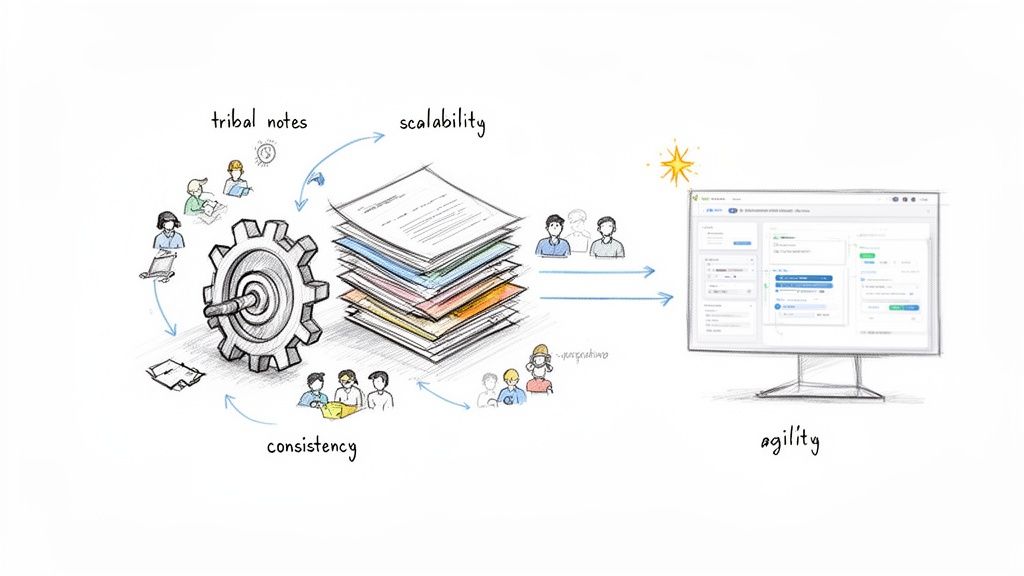
This shift isn't just about looking more organized; it's about building a foundation for real growth and agility.
Traditional SOPs vs Modern Interactive Guides
The difference between old-school docs and modern guides becomes crystal clear when you compare them side-by-side. One is a relic; the other is a tool built for how we work today.
Feature | Traditional SOP (e.g., Word Doc/PDF) | Modern Interactive Guide (e.g., Build a Guide) |
|---|---|---|
Creation | Manual, time-consuming text and screenshots | AI-powered from a screen recording in minutes |
Format | Static wall of text | Interactive steps with screenshots, video, and GIFs |
Accessibility | Buried in shared drives, hard to find | Searchable, shareable with a link, mobile-friendly |
Updates | Painful manual process, often neglected | Edit any step instantly, updates are live for all users |
Engagement | Low; often ignored or skimmed | High; visual and step-by-step format encourages use |
Analytics | None; no idea if it's being used or working | Tracks views and completions to measure effectiveness |
Integration | Isolated document | Embeddable in apps, help centers, and wikis |
Ultimately, a PDF can only describe a process. An interactive guide lets your team walk through it.
The Real-World Value for Your Team
When you build a proper step-by-step guide, you’re not just making another document. You're building a system for operational excellence.
For an agency, this could mean standardizing the client onboarding process, ensuring every new customer gets the same high-quality experience. For an HR department, it could be an interactive guide that walks a new hire through setting up their software and benefits, cutting down on anxiety and freeing up managers' time.
This is the foundation for everything that follows. Now, let’s get into the practical steps of how to create guides that actually work.
Planning Your Guide For Maximum Impact
A great step-by-step guide doesn't start when you hit 'record'—it starts with a solid plan. Rushing into the creation process without a clear strategy is like trying to build furniture without instructions. You might end up with something, but it probably won’t be functional or reliable.
The planning phase is where you turn a vague idea into a blueprint for clarity. It’s what makes a guide genuinely helpful.
Defining Your Audience and Objective
Before you even think about the steps, you need to nail down two things: the audience and the objective. Who is this for, and what should they be able to do after they're done? These two questions dictate everything that follows.
Think of it this way: a guide for a brand-new client who’s never seen your software will look completely different from an internal guide for your engineering team. The client needs simple language and a friendly, encouraging tone. Your engineers, on the other hand, just need a precise, efficient walkthrough that skips the fluff.
To get this right, ask yourself these questions:
Who is the end-user? A tech-savvy developer, a non-technical client, or a new hire feeling overwhelmed on their first day?
What's their current knowledge level? Are you starting from absolute zero, or do they already know the basics?
What is the single, clear outcome? When they finish the last step, what task should be completed? “Submit an expense report” or “Set up a new client project in Asana” are great, specific goals.
Answering these questions prevents the most common failure point for any guide: ambiguity. When the goal is fuzzy, the steps will be too.
Scoping the Process and Outlining the Flow
Once you know your audience and objective, it's time to scope the process. This just means breaking down a big workflow into a logical sequence of smaller, more focused guides. A huge, monolithic guide covering every possible scenario is intimidating and rarely gets used.
For example, instead of one massive guide called “New Client Onboarding,” you could break it down into a series:
Creating the Client Folder in Google Drive
Setting Up the Client in the Project Management Tool
Sending the Welcome Packet and Kickoff Email
This approach makes each guide easier to create, follow, and—most importantly—update. Your team can find exactly what they need without digging through irrelevant information. If you need a good starting point for structuring your workflow, our standard operating procedure template can really help.
Planning isn't an extra step; it's the most important one. Spending 15 minutes outlining your guide's audience, objective, and flow can save you hours of re-recording and editing later. It’s the difference between a helpful resource and a confusing document.
Finally, gather all your necessary assets before you start recording. This is a pro tip that prevents awkward pauses and mistakes during the capture.
Here’s a quick pre-flight checklist:
Logins and Passwords: Have all credentials ready to go.
Sample Data: Prepare any example client names, project details, or files you'll need.
Clean Workspace: Close unnecessary tabs and notifications. A clean, focused recording is way easier to follow.
A little prep work ensures a smooth capture process, which leads directly to a clearer, more professional guide. It respects your audience's time by getting straight to the point.
Capturing Your Workflow With AI Assistance
This is where your planning pays off. It’s time to turn that abstract process into a real, tangible guide someone can actually follow.
The old way was painful. You’d perform an action, pause, take a screenshot, paste it somewhere, write a description, and then repeat that cycle until your soul left your body. Thankfully, that entire ordeal is a thing of the past.
With modern tools, you just hit ‘record’ and do the task. The software handles the rest.
The key to a great guide is a clean recording from the start. Your goal is to move through the workflow smoothly, as if you were showing a coworker how to do it over their shoulder.
Move with intention. Guide your cursor directly to the buttons and fields you need. Avoid frantic, jerky mouse movements that just create visual noise.
Talk it out. Narrate your steps as you go. Explain why you’re clicking something or what a specific field means. This audio context is incredibly useful, even if it's just for you.
Keep it clean. Before you start, close any unrelated tabs, apps, and notifications. A focused recording leads to a focused, professional guide.
From Recording To Guide—Instantly
Once you stop the recording, the real magic happens. Instead of you manually breaking down your own actions, AI takes over. The software analyzes your entire recording—every click, every typed word, every page change—and instantly structures it into a sequence of steps.
This is the night-and-day difference from old-school documentation. What used to take an hour of tedious, manual work now happens in seconds. For workflows captured on video, knowing how to transcribe video to text online can also be a massive help in building out your guide. The AI does all the heavy lifting, generating a complete first draft for you.
The AI doesn’t just give you a video. It deconstructs your actions into a fully editable guide. Each click becomes a distinct step, complete with an annotated screenshot showing exactly where you clicked.
Here’s a look at how to properly plan your guide's structure, focusing on the audience, objective, and scope before you even begin recording.
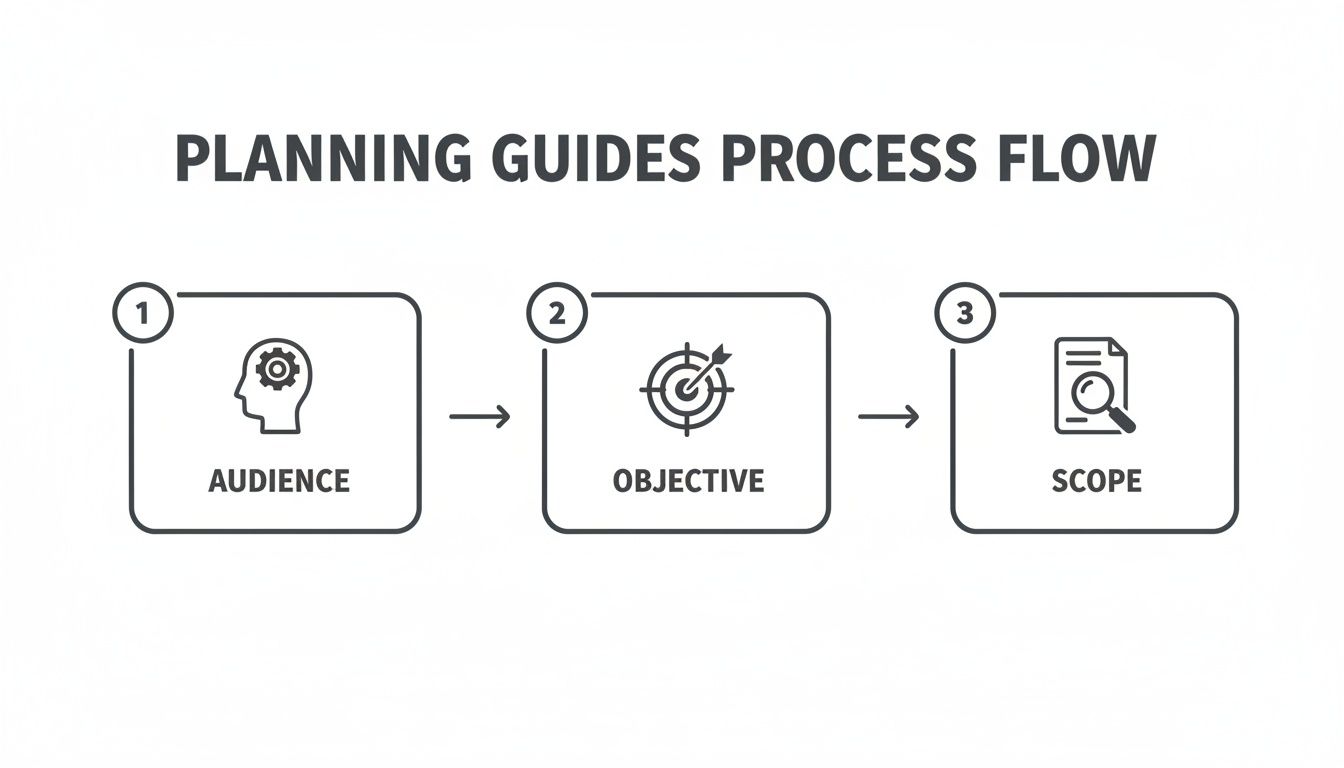
This simple flow reminds us that a great final guide always starts with a clear plan.
Handling Complex And Conditional Workflows
But what about processes that aren’t a straight line? Many workflows have forks in the road—"if this happens, do that instead." Capturing these might seem tricky, but the strategy is simple.
Just record the most common path first. This becomes your core guide.
Then, during the editing phase, you can add notes, callouts, or even link to separate guides for the alternative paths. For instance, after recording the standard client approval process, you could add a note on the final step: "If the client requests revisions, follow our Revisions Process guide." This keeps your main guide clean and easy to follow.
This automated approach isn't just a convenience; it delivers real business results. Data shows that businesses using interactive SOPs see 35% higher completion rates on onboarding flows. Customer success teams can record a demo and let AI generate a guide that cuts time-to-value by 45%. And HR managers have seen 60% faster new-hire productivity using rich-text editable SOPs.
The goal of this capture phase is to generate a strong first draft. Thanks to AI, that draft is already 90% of the way there, saving you a huge amount of time. From here, you’ll move on to the refinement stage, where you add the human touches that make a guide truly great. For a deeper look at the tools that make this all possible, check out our breakdown of the best SOP creation software. This tech frees you up to focus on adding value, not taking screenshots.
Refining and Enriching Your Automated Guide
The AI-powered capture gives you a massive head start, spitting out a draft that’s already most of the way there. But this is where the human touch comes in. This is how a good guide becomes one people actually trust and use.
The refinement stage is where you add the context, clarity, and foresight that automation can't guess. It’s how you build a resource that doesn’t just show the steps but anticipates the questions and prevents the headaches before they happen.
Think of the AI draft as a perfectly structured skeleton. Your job is to add the muscle and personality.
A Practical Checklist for Guide Refinement
Once you have your draft, it's time to put on your editor's hat. Look at the guide from the user's perspective. What’s going to trip them up? Where could a tiny tip save them 20 minutes of frustration?
This is what makes a step by step guide feel less like a robot's instructions and more like a helpful colleague walking you through something.
Here’s a practical checklist to run through:
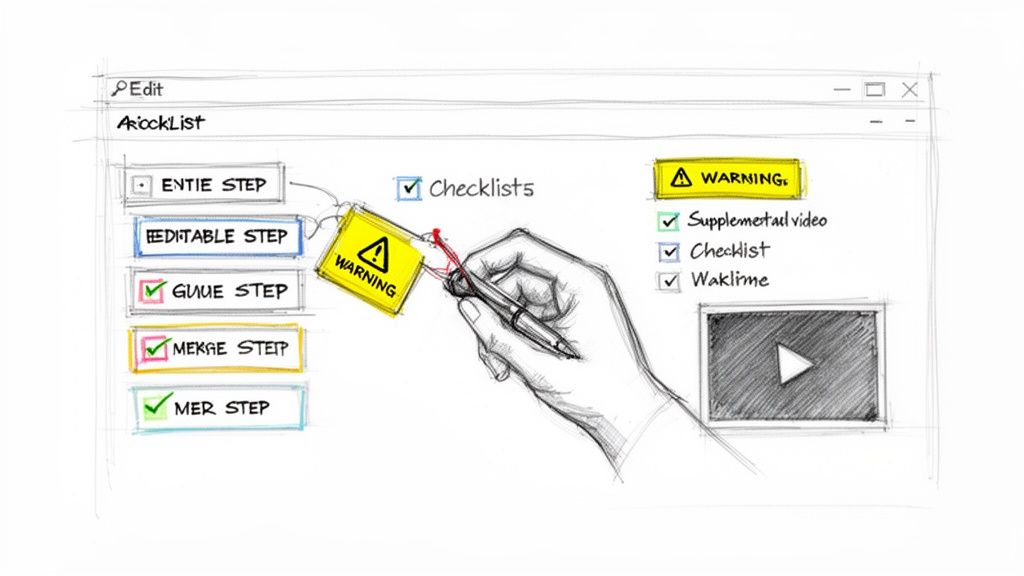
Clarify Action Titles: The AI might generate a title like "Click button." You can make that instantly better by changing it to "Click ‘Save and Continue’ to Finalize Settings." Specificity is everything.
Add Contextual Notes: Use notes to explain the why behind a step. A simple note like, "We use this naming convention so projects are searchable later," adds a huge amount of value.
Include Warnings and Pro Tips: Is there a common mistake people make right here? Add a highly visible warning. "Heads up: Do not check this box if the client is on the Basic plan." This alone can save a support ticket.
Merge or Split Steps: Sometimes the AI creates two steps for what is really one fluid action. Merge them. Other times, it groups too much into one. Split a complex step into two simpler ones to make it easier to follow.
Enhancing Your Guide with Rich Media and Interactivity
Refinement isn't just about the words. A modern step by step guide should be a multimedia experience that works for different learning styles.
If one step covers a tricky concept, why not embed a quick two-minute video explaining it? This gives extra help to those who need it without cluttering the guide for everyone else. You can also link out to relevant knowledge base articles, company policies, or other key resources.
The most effective guides don't just document a process; they become a central hub of knowledge for that task. By embedding videos, links, and notes, you’re building a resource that reduces follow-up questions and empowers people to be self-sufficient.
Real-World Scenarios in Action
Let’s see how this plays out. Imagine a customer support team creating a guide for a common troubleshooting issue. After the AI generates the basic steps, a support lead could jump in and add:
Troubleshooting Tips: A note that says, "If you see an error here, it usually means your cache needs to be cleared. Here’s a link to a guide on how to do that."
Checklists: An interactive checklist at the end to confirm success, like "Verify the changes on the main dashboard."
Now, think about an agency onboarding a new client. After recording the initial setup, the project manager could customize the guide with:
Client-Specific Branding: Adding the client's logo or a personalized welcome message.
Embedded Welcome Video: A short Loom video from the account manager welcoming the client and explaining what the guide covers.
Important Links: Quick links to the project board, shared drive, and communication channels.
These additions feel small, but they make a massive difference. They show you’ve thought through the user's needs and have provided a truly polished resource, not just a list of instructions.
Sharing Your Guide For Peak Team Adoption
Creating a flawless, refined guide is a huge accomplishment, but it's only half the battle. A guide no one can find is just a well-crafted secret. The final, critical phase is all about strategic distribution—making sure your hard work actually gets seen and used by your team and clients.
This isn’t just about sending a link in an email. It’s about weaving your guides into your team’s daily ecosystem so they become the go-to resource for getting things done right. A successful rollout turns your library of guides from a simple documentation project into the central nervous system of your operations.
The goal is to make finding the right process as easy as asking a question. When you get that right, you unlock serious efficiency.
Create a Centralized Knowledge Hub
The most effective way to drive adoption is to stop treating guides as individual files scattered across drives and folders. Instead, think of them as assets in a single, searchable library. This is where creating a branded hub for all your company SOPs becomes a game-changer.
A dedicated hub, maybe even on a custom domain, offers a single source of truth.
For internal teams: It means no more digging through shared drives or outdated wikis.
For clients: It provides a professional, seamless experience that reinforces your brand's expertise and attention to detail.
This approach transforms your collection of processes into a living knowledge base that grows with your organization. It signals to everyone that clear documentation isn't an afterthought—it's a priority.
A guide is only as good as its accessibility. If it takes more than 30 seconds to find the right process, people will revert to asking coworkers, defeating the entire purpose of creating the guide in the first place.
Building this central resource is foundational. For distributed teams, turning tribal knowledge into interactive SOPs via screen recordings cuts inconsistencies by 55%. When you take those powerful guides and put them in one easy-to-find place, their impact multiplies. You can find more details on how technology is boosting business productivity in the 2026 manufacturing industry predictions.
Strategies for Rolling Out New Guides
Once your hub is in place, you need a plan for introducing new and updated guides. A simple announcement can make all the difference between a guide being adopted or completely ignored.
Consider creating a simple template for announcements in your main communication channel, like Slack or Microsoft Teams.
Example Announcement Template:
Title: ✨ New Guide Published: How to Set Up a New Client Project
What it is: A complete step by step guide for the entire client project setup process in Asana, from creating the project to assigning initial tasks.
Who it's for: Project Managers and Account Managers.
Why it matters: This standardizes our setup process, ensuring no steps are missed and all clients get a consistent kickoff experience.
Link: [Access the full guide here in our SOP Hub!]
This structure quickly communicates the value and directs people to the right place. Beyond announcements, embedding guides directly where the work happens is incredibly powerful. You can link to a guide from a task template in your project management tool or embed it right into your internal wiki. For more ideas, check out our full walkthrough on how to create a step-by-step guide that your team will actually use.
Measure Engagement and Gather Feedback
Your work isn't done after you hit publish. A modern approach to documentation means closing the feedback loop. Use engagement analytics to see which guides are being viewed most, where users might be dropping off, and how often they are being completed.
This data is pure gold.
It tells you which processes are most critical (or most confusing) and helps you prioritize which guides to review or update next. Encourage your team to leave comments directly on guides with questions or suggestions. This collaborative approach ensures your SOP library remains accurate, relevant, and genuinely helpful over time.
Common Questions About Creating Guides (And Straight Answers)
Even with a great plan and the right tools, questions always come up once you start building out a real library of guides. That’s a good sign. It means you’re thinking critically about how to make your processes as clear and effective as possible.
Let's walk through some of the practical concerns we hear all the time. These are the hurdles that can slow teams down, but they're easy to clear once you know how.
How Long Should A Step By Step Guide Be?
There’s no magic number. A guide’s length should match the task’s complexity. A simple process like submitting a timesheet might only take 5-7 steps. A complex software configuration could easily top 50.
The real rule is this: one process, one guide.
Don't cram multiple workflows into a single monster document. Focus on making one specific task perfectly clear. If a guide starts feeling too long or confusing, that’s your cue to break it down.
For example, a massive "New Client Onboarding" guide is better as a few smaller, focused ones:
Creating the Client Folder & Permissions
Setting Up the Project in Your PM Tool
Sending the Official Welcome Packet
This approach makes each guide easier to follow. More importantly, it makes them far easier to update later.
What Is The Best Way To Keep Guides Up To Date?
This is the biggest reason company wikis become digital graveyards. The only way to win is with a proactive review process and clear ownership. Don’t leave updates to chance.
For product guides, bake a mandatory review into your process before every major feature release. For internal operations, a quarterly check-in is a solid baseline.
Keeping guides current requires a system, not just good intentions. The most effective approach is to assign a direct owner to each guide and tie update reviews to specific business triggers, like a software update or a new policy launch. This prevents documentation decay.
Using a cloud-based platform is critical here, since you only have to update the guide in one place. Features that let teammates comment on specific steps are also a game-changer, creating a natural feedback loop that helps your library evolve with your business.
How Do I Encourage My Team To Actually Use The Guides?
You can create the world's best guides, but they're useless if no one opens them. Getting your team to adopt them comes down to three things.
First, make them incredibly easy to find. A central, searchable hub isn't a nice-to-have; it's essential. If finding a guide takes longer than asking a colleague, your team will always take the path of least resistance.
Second, weave the guides into your existing workflows. Link to the relevant guide directly from your project management tasks, CRM records, or onboarding checklists. You're putting the information right where people need it, right when they need it.
Finally, lead by example. When someone asks a question that’s covered in a guide, send a friendly reply with a direct link. This simple habit gently trains everyone to look there first, building a culture of self-sufficiency. For more on this, many platforms offer a dedicated Frequently Asked Questions section with other valuable perspectives.
Can I Create Guides For Processes Beyond A Computer Screen?
Absolutely. Screen recordings are perfect for digital workflows, but the same principles apply to physical tasks. You just swap out the capture method.
Instead of recording your screen, grab your phone and take a series of clear photos or a short video of the process. You can then upload that media and build out the steps just like any other guide.
Attach a photo or video clip to each step for visual context. Then, use rich-text features to add critical details:
Notes to explain why something is important.
Callouts to highlight specific parts of an object.
Checklists to serve as quality control points.
This is perfect for documenting anything from setting up trade show equipment to performing a physical safety check in a workshop. It ensures every single process in your business can be standardized and clear.
Ready to stop tribal knowledge from slowing you down? With Build a Guide, you can turn any process into a clear, interactive, and easy-to-follow guide in minutes. Start creating a central source of truth that empowers your team, delights your clients, and scales your business.