
March 1, 2026
What Is Workflow Automation and How Does It Work
Curious about what is workflow automation? This guide explains how it works, its benefits, real-world examples, and how you can start implementing it today.
At its heart, workflow automation is about using technology to handle the repetitive, rules-based parts of your job so you don't have to. It's like setting up a smart coffee maker that grinds, brews, and pours your coffee with one button press—freeing you up for more important things.
What Is Workflow Automation Explained Simply
Think about all the little, repeatable tasks that eat up your day. Sending a confirmation email after someone fills out a form. Creating a new client folder in your shared drive. Nudging a team member when a project stage is finished.
On their own, each task seems small. But together, they drain hours of valuable time and are a perfect breeding ground for human error. This is exactly where workflow automation steps in.
Essentially, workflow automation runs on a simple but incredibly powerful logic: “If this happens, then do that.” It’s all about creating a sequence of automated actions for tasks that people usually do by hand.
This sequence is built on two core components:
Triggers: A trigger is the specific event that kicks off an automated workflow. This could be anything from a customer completing a purchase to a new email landing in your inbox with a certain keyword.
Actions: An action is the task—or series of tasks—that the system performs automatically once the trigger fires. Actions could include sending a notification, updating a spreadsheet, or creating a task in a project management tool.
The Basic Logic of Automation
Let's say you want to automate new customer onboarding. The trigger is a customer signing their contract.
Once that happens, the automated actions could be to instantly:
Create a new client folder in your shared drive.
Send a welcome email with helpful resources.
Add a task for the project manager to schedule a kickoff call.
The goal is to build a self-operating process that runs the exact same way, every single time, without anyone needing to manually start it. That shift from manual effort to automated execution is where businesses find huge gains in speed, accuracy, and scale. For a deeper dive, it's helpful to see how this applies in specific areas like document automation, which can completely change how you handle invoices, contracts, and more.
The difference becomes crystal clear when you compare the old way with the new way.
Manual Processes vs Automated Workflows
This table highlights just how stark the contrast is between doing things by hand and letting automation take over.
Aspect | Manual Process | Automated Workflow |
|---|---|---|
Speed | Slow, dependent on human availability and speed. | Instantaneous, runs 24/7 without delays. |
Accuracy | Prone to human error, typos, and forgotten steps. | 100% consistent, follows the exact rules every time. |
Scalability | Difficult to scale; more volume requires more people. | Easily handles high volumes without additional effort. |
Cost | High labor costs for repetitive, low-value work. | Low operational cost after initial setup. |
Monitoring | Hard to track; relies on manual checks and updates. | Provides a clear audit trail and real-time status updates. |
As you can see, it's not just a minor improvement—it's a fundamental change in how work gets done.
The Role of Clear Process Documentation
Here’s the critical part that most people miss: you cannot automate a process you haven't clearly defined.
An automated workflow is only as good as the instructions it follows. This is why good process documentation is the essential first step. A well-written Standard Operating Procedure (SOP) acts as the perfect blueprint or recipe for your automation. You can learn more about creating these foundational documents in our guide on what is process documentation.
By first mapping out each step, condition, and outcome, you provide the exact logic an automation tool needs to run flawlessly. Without that clarity, you’re just automating chaos.
How an Automated Workflow Actually Works
To really get what workflow automation is, you have to look under the hood. It’s far from magic. Every automated workflow, no matter how powerful it seems, runs on a simple, logical sequence that anyone can understand. It’s all about teaching software to follow a script you’ve already laid out.
At its heart, automation boils down to just three key ingredients:
Triggers: The specific event that kicks off the entire process.
Conditions: The optional "if/then" rules that decide if the process should continue.
Actions: The tasks that the software performs automatically.
This simple Trigger → Condition → Action model is the engine that drives nearly all business process automation. It's less like building a robot and more like setting up a line of digital dominoes.
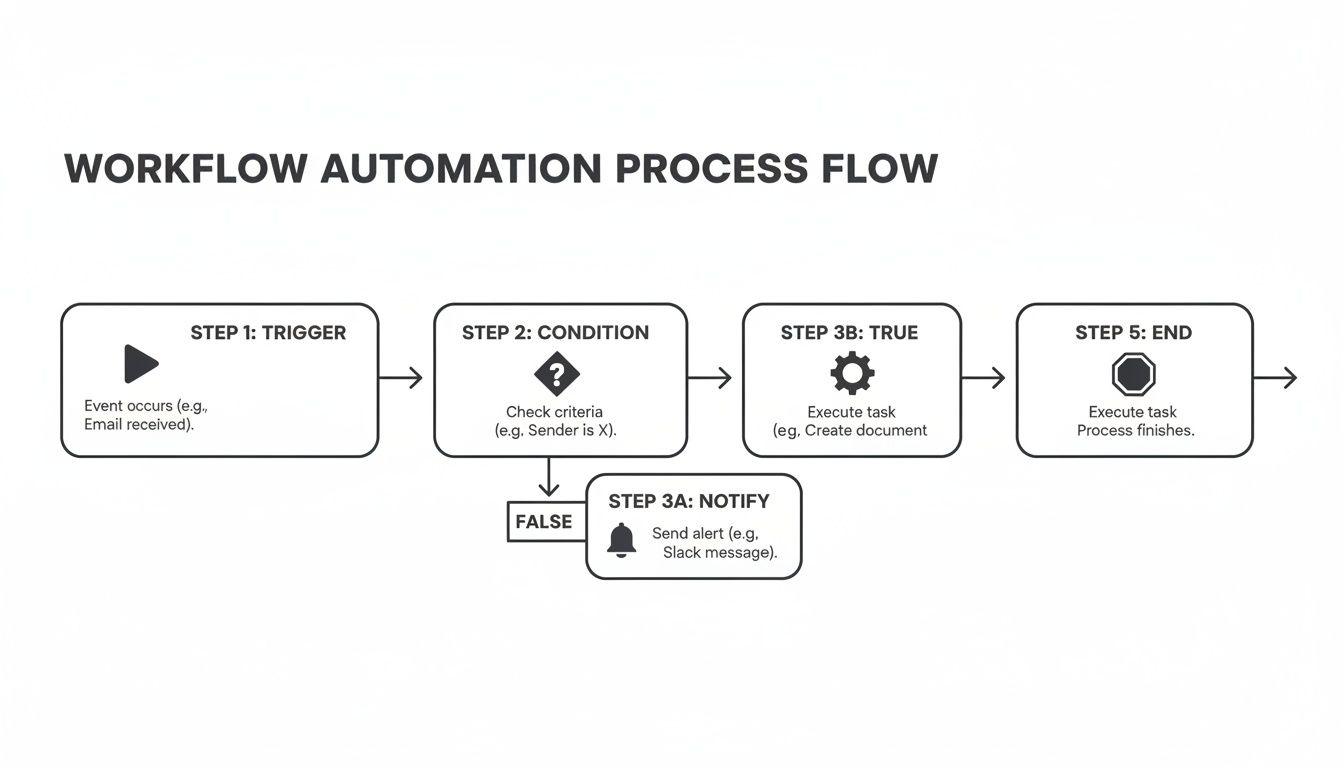
This diagram shows the clean, linear logic of how an automated workflow moves from a starting event to a final, completed task. It’s not one single event, but a structured sequence where a defined trigger sets off one or more specific actions.
The Three Core Components of Automation
Let's break down each part.
1. The Trigger A trigger is the starting pistol for your automated process. It’s the very first event that tells your system, "Okay, it's time to go!" Without a trigger, the automation never even begins.
Common examples of triggers include:
A new row is added to a Google Sheet.
A customer submits a form on your website.
An email with a specific subject line arrives in your inbox.
A deal in your CRM is marked as "Won."
The trigger is the "if this happens..." part of the equation. It's the first domino to fall.
2. The Condition (The Optional Filter) Conditions are the smart filters of your workflow. They bring in "if/then" logic, letting the automation make a decision before it acts. A workflow will only move forward if the specific conditions you set are met.
Conditions add a layer of precision, ensuring the right actions happen for the right reasons. This prevents the system from acting on every single trigger, saving time and resources by only processing relevant events.
For instance, you might only want a workflow to run if a new customer's purchase is over $100, or if a new hire's department is "Marketing." Conditions make your automation smarter and more targeted.
3. The Action Actions are the "…then do that" part of the workflow. This is where the actual work gets done for you. Once the trigger event occurs and any conditions are met, the system executes one or more predefined tasks.
An action can be almost anything you can do on a computer, like:
Sending a templated email or Slack message.
Creating a new card in Trello.
Updating a customer record in your CRM.
Generating an invoice and saving it to a specific folder.
These three components—trigger, condition, and action—work together to form a complete, self-operating process.
A Real-World Onboarding Example
Let's apply this to a common headache: new employee onboarding. The manual version is a mess of emails, calendar invites, and login requests. Here’s how you can automate it.
Trigger: An HR manager changes a candidate's status to "Hired" in the company's HR software. This single click starts the entire workflow.
Condition: The workflow checks if the new hire's department is "Marketing." If it's Sales or Engineering, this specific workflow stops, and a different one might begin.
Actions: If the condition is met, the system automatically fires off a series of tasks:
Sends a personalized welcome email to the new hire.
Creates user accounts in marketing-specific software (like Mailchimp or HubSpot).
Assigns the official "Marketing Team Onboarding" guide to the new hire's to-do list.
Notifies the head of marketing via Slack that their new team member's setup is complete.
What used to take hours of manual back-and-forth now happens instantly and without error. The key takeaway is that the automation tool is just executing the plan you've already defined.
This is exactly why having clearly documented procedures is so fundamental. Your workflow is only as reliable as the process you design for it. You can learn more about the best process documentation tools to create these blueprints. A good tool doesn't just run the process; it follows the guide you give it.
The True Business Impact of Automating Workflows
It’s one thing to understand how workflow automation works. It's another to see what it actually does for a business. The real "why" behind automation isn't about fancy tech—it's about the very real return on investment it delivers to your bottom line.
This isn't about small, incremental tweaks. It's a fundamental shift in how your business operates, scales, and competes. By taking repetitive, manual tasks off your team's plate, you unlock a powerful combination of savings, speed, and quality.
Slashing Costs and Boosting Efficiency
One of the first and most obvious wins is a massive jump in operational efficiency. When you automate something like invoice processing or new client onboarding, you're not just making it faster—you're making it cheaper.
Tasks that once took hours of paid employee time can now run in seconds. An automated system works 24/7 without breaks. This frees up your smart, talented people from soul-crushing repetitive work. Instead of copying and pasting data between apps, they can focus on high-value work only a human can do: strategy, building customer relationships, and creative problem-solving. You don't just save on labor; you get more value from the team you already have.
A core principle of automation is simple: a person should never have to do a task a machine can do. Sticking to this reclaims thousands of hours that were previously lost to manual, low-impact work.
Dramatically Reducing Human Error
To err is human, but in business, mistakes are expensive. A typo in an invoice delays payment. A missed step in an onboarding process sours a new client relationship. Bad data entry pollutes your CRM. Manual processes are full of these little traps.
Workflow automation virtually eliminates them.
By following a predefined set of rules without fail, an automated system ensures every process runs with 100% consistency and accuracy. Every step is executed exactly as designed, every single time. This reliability creates a cascade of benefits:
Improved Data Integrity: Your systems of record stay clean and accurate because data is moved and updated automatically.
Enhanced Compliance: For regulated industries, automation guarantees every required step and approval is documented, creating a perfect audit trail.
Better Customer Experiences: Customers get the right information at the right time, without delays or mistakes caused by someone forgetting a step.
The confidence that comes from knowing your core processes are running perfectly is a huge competitive advantage.
Improving Employee Morale and Focus
Nothing burns out good employees faster than forcing them to do dull, repetitive work. When your team feels like they're stuck in a loop of administrative busywork, their morale and motivation nose-dive. It's a hidden cost that hurts everything from productivity to retention.
Automation has a profound, positive effect on the employee experience. By handing off the tedious work to software, you empower your team to tackle more meaningful and challenging projects. They can use their skills for innovation and growth, not just managing a checklist. This doesn’t just boost job satisfaction; it builds a culture where people feel valued for their thinking, not just their ability to follow instructions.
Why Your Competitors Are Already Investing
The shift to automation isn't a niche trend; it's a mainstream business strategy. The market for these tools has become a critical part of the modern tech stack. In fact, one analysis showed the market reached a valuation of USD 26.01 billion in 2026 and is projected to expand to USD 40.77 billion by 2031. You can discover more insights about these market trends and see just how widespread adoption has become.
That explosive growth is a clear signal: your competitors are already using automation to get faster, leaner, and more efficient. Businesses that wait are simply choosing to operate with higher costs and slower execution. In today's market, workflow automation isn't a luxury—it's essential for staying competitive.
Theory is great, but seeing how workflow automation actually works in the real world is where its value becomes undeniable. The core logic of triggers and actions can be applied to almost any business function, turning messy, multi-step processes into smooth, hands-off operations.
Let’s look at four real-world examples to show you what this looks like in practice. These aren't just about simple tasks; they show how connecting different apps and setting up smart rules can solve common business headaches, from internal operations to customer experience.
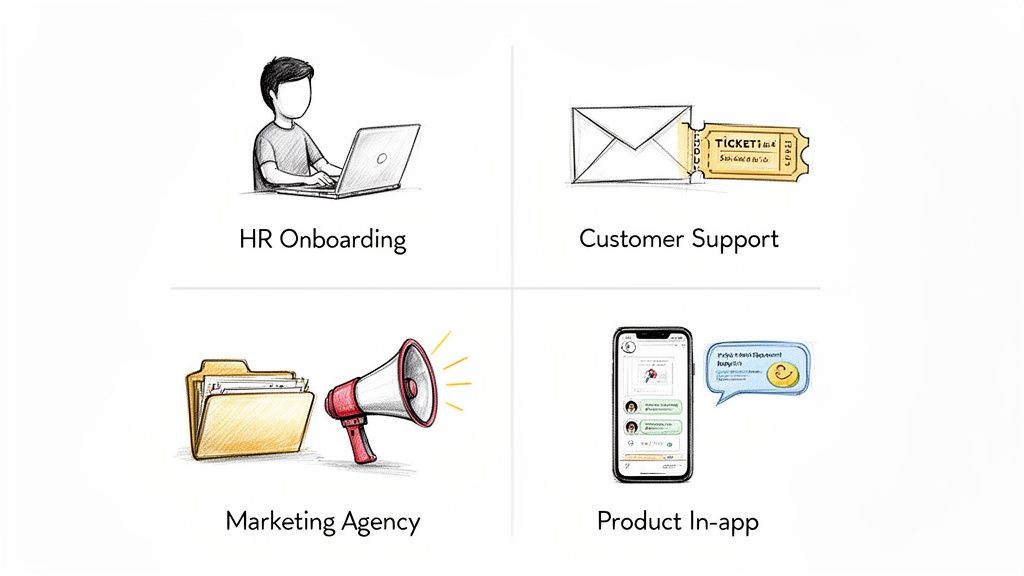
Streamlining New Hire Onboarding for HR
Manually onboarding a new employee is a classic administrative nightmare. It’s a tangled web of emails, checklists, and follow-ups across multiple departments. The process is slow, full of potential errors, and a terrible first impression for a new team member.
Here’s how automation changes the game.
Trigger: An HR manager updates a candidate's status to "Hired" in the company's HR system.
Actions: The moment this happens, a chain reaction of tasks kicks off automatically:
IT gets a notification to create new email and system accounts.
The finance team receives an alert to start the payroll setup process.
A welcome email is sent to the new hire with their start date and first-day info.
An onboarding guide, built as an interactive SOP, is automatically assigned to the new hire's task list.
The result is a faster, more consistent onboarding experience. The new employee feels welcomed and ready from day one, and the HR team gets back hours of admin time—all while making sure no critical step is ever missed.
Supercharging Customer Support Teams
A busy customer support inbox is a constant race against the clock. Manually reading every email, creating a ticket, and figuring out who should handle it creates delays that frustrate customers.
Automation brings speed and order to that chaos.
A well-designed support workflow ensures every customer request is acknowledged instantly and routed correctly, turning a reactive process into a proactive one. This simple change can dramatically improve customer satisfaction.
Consider this automated workflow:
Trigger: A new email lands in the support@company.com inbox.
Actions: The system immediately gets to work:
The email content is scanned for keywords like "billing issue" or "password reset."
Based on the keyword, a new ticket is created in the helpdesk software and tagged with the right category.
The ticket is automatically assigned to the correct support agent or team (e.g., billing issues go to the finance team).
An instant auto-reply is sent to the customer, confirming their message was received and providing a link to a relevant troubleshooting guide.
This automated triage frees up support agents to spend less time on admin and more time solving complex problems. Customers get faster responses and feel heard, which leads to better retention and loyalty.
Onboarding New Clients at a Marketing Agency
For agencies, the first few days with a new client set the tone for the entire relationship. A clunky, manual onboarding process can kill confidence before the real work even begins. Automation makes sure the kickoff is polished and professional every single time.
Trigger: A client signs a contract, and their deal is marked as "Won" in the agency's CRM.
Actions: The workflow springs into action to create a perfect start:
A beautiful, branded welcome kit is automatically emailed to the client.
A new shared project folder is created in Google Drive or SharePoint with a standardized subfolder structure.
A new project is created in the agency’s project management tool, like Trello or Asana.
The initial discovery tasks are automatically assigned to the account manager and project lead.
The result is a smooth, impressive onboarding that makes the client feel valued. Internally, the agency saves countless hours on setup, letting the team focus on strategy and delivering results from day one. It's a clear demonstration of efficiency that builds immediate client trust.
The Next Frontier of Intelligent Automation
Standard workflow automation is great at handling predictable, rules-based tasks. But its real power kicks in when it gets smarter. The next big leap is moving past simple "if-then" commands and into the world of intelligent automation, where your processes can start to think, adapt, and even learn.
This is where Artificial Intelligence (AI) and Machine Learning (ML) enter the picture.
Instead of just following a rigid script, an AI-powered workflow can make judgments. It can look at unstructured data—like the actual words in a customer email or the content of a PDF—and decide what to do next based on what it finds. This adds a powerful layer of perception and reasoning that basic automation just doesn't have.
From Rules-Based to AI-Driven
Think of the difference this way: a standard workflow is like a checklist, while an intelligent workflow is more like an experienced assistant. The checklist ensures tasks get done, but the assistant can read the room, understand the situation, and decide on the best course of action.
This is a massive shift in what automation can actually accomplish.
An intelligent system doesn't just process a task; it understands the context behind it. It can analyze sentiment, identify priorities, and even suggest solutions, turning a simple workflow into a dynamic, problem-solving engine.
Looking ahead, this blend of AI and process is what defines the next era of efficiency, often called AI automation. This isn't some far-off concept; it’s happening right now and completely reshaping what’s possible for businesses.
How AI Enhances an Automated Workflow
So, what does this actually look like day-to-day? Imagine a customer support automation that does more than just log a ticket when an email comes in.
Sentiment Analysis: The AI can read the customer’s email and instantly detect if their tone is frustrated, urgent, or just neutral. A frustrated customer's ticket automatically gets flagged for immediate attention.
Intelligent Routing: By understanding the content of the request, the AI can route the ticket directly to the team member with the right expertise—not just to a general queue.
Suggested Solutions: The system can analyze the problem described in the email, cross-reference it with past solutions in your knowledge base, and arm the support agent with the most likely fix before they even start typing a reply.
This combination of automation and intelligence doesn't replace the human agent. It supercharges them. The agent spends less time on diagnosis and administrative work and more time actually delivering a great customer experience.
The market impact of this shift is undeniable. The convergence of workflow automation with AI and machine learning is a major growth driver. While traditional workflow automation was a USD 20.3 billion market in 2023 with a projected 10.1% growth rate, adding AI to the mix is changing the game. In fact, market analysis shows that generative AI copilots are contributing an extra 2.3% growth acceleration in key markets, a clear sign of their rising importance. You can read the full research about these automation trends to see the data for yourself.
This move toward smarter systems makes one thing even more critical: having well-documented processes. Your AI learns from your established procedures. Your SOPs essentially become the training data for a more intelligent, adaptable, and efficient organization.
Your Blueprint for Implementing Automation
Knowing what workflow automation is and actually doing it are two very different things. It’s easy to get overwhelmed by the idea of implementation, but you can get there by following a clear, strategic blueprint.
The most important part? Planning comes first. You have to know exactly what you’re automating—and why—long before you even think about picking a tool.
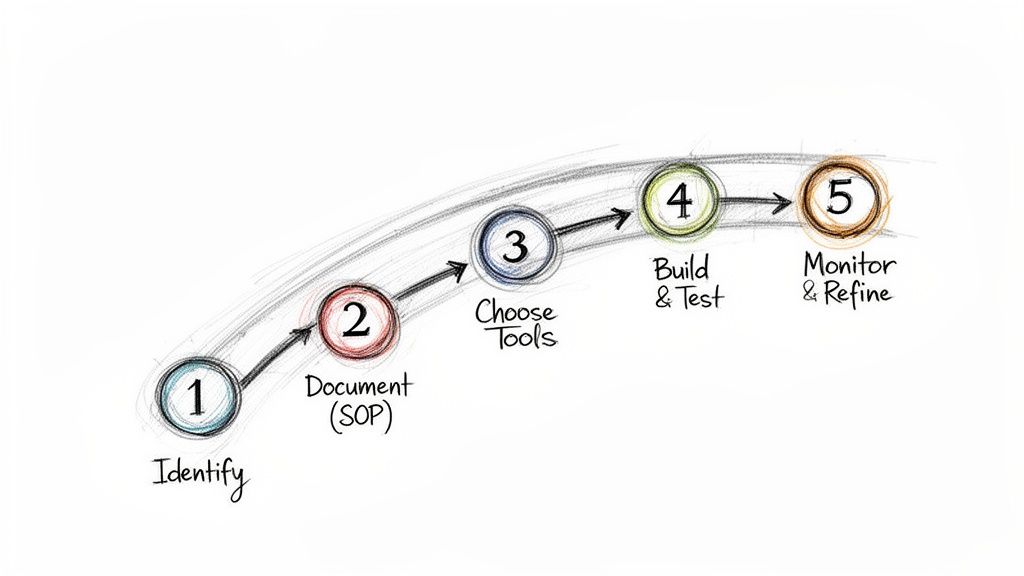
This whole journey starts not with software, but with simple observation. Look around for the small, repetitive tasks that drain your team's energy and time. Those are your best starting points.
Step 1: Identify Your Best Opportunities
Start with the low-hanging fruit. You’re looking for processes that are:
Highly Repetitive: Think about tasks done the same way, multiple times a day or week. This could be anything from sending follow-up emails to creating new project folders.
Time-Consuming: These are the administrative black holes that suck up employee hours but don't deliver much strategic value.
Prone to Human Error: Any process where a simple typo or a forgotten step can create a massive headache down the line is a perfect candidate.
Choosing a process with these traits guarantees a quick, visible win. That early victory builds momentum and makes it much easier to get buy-in for more ambitious projects later on.
Step 2: Document Your Process
This is, without a doubt, the most critical step. You cannot automate a process you haven't clearly defined. Before you can teach a machine to do something, you have to be able to map out every single step yourself.
This is where a Standard Operating Procedure (SOP) becomes your foundation. Map out the entire workflow from beginning to end—what triggers it, what actions happen, and where decisions are made. A clear process document is the literal blueprint your automation tool will follow. A solid process management strategy is essential for making this documentation effective and scalable.
Step 3: Choose the Right Tools
Once your process is on paper, you can finally start looking at technology. Automation tools come in all shapes and sizes, from simple to incredibly powerful.
Simple Connectors: Tools like Zapier or Make are perfect for linking two or three cloud apps. A classic example is creating a Trello card automatically whenever a new Google Form is submitted.
Business Process Management (BPM) Software: These are more robust platforms built to handle complex, multi-stage workflows that span different departments and involve multiple decision points.
The key is to start with a tool that matches the complexity of the job. Don't over-invest in a monster system to handle a simple, two-step task.
Step 4: Build, Test, and Deploy
With your SOP as your guide, it’s time to build the workflow in the tool you chose. Most modern platforms use visual, drag-and-drop interfaces, so you likely won't need to write a single line of code.
But before you go live, test everything. Seriously. Run through every possible scenario you can think of to make sure the automation behaves exactly as you expect. Once you’re confident it’s working flawlessly, you can roll it out to your team.
Step 5: Monitor and Refine
Your job isn't over just because the automation is live. You need to keep an eye on your new workflow to make sure it's running correctly and actually delivering the benefits you hoped for.
And as your business grows and your needs change, be ready to go back and refine your automations. What works perfectly today might need a tweak in six months.
A common pitfall is automating a broken process. If your manual workflow is inefficient or flawed, automating it will only make the wrong things happen faster. Always fix the process first, then automate.
The commitment to this approach is becoming universal. Market analysis shows the workflow automation market is expected to surge to USD 80.57 billion by 2035, a massive jump from 2026. With over 80% of organizations planning to increase their automation spending, now is the time to build your own blueprint. You can read about the rapid growth of automation solutions to see just how big this shift is.
Frequently Asked Questions About Workflow Automation
As you start exploring workflow automation, a few practical questions almost always pop up. It’s important to understand the nuances between different technologies and see how automation can fit into businesses of any size.
Here are the answers to some of the most common questions we hear.
What Is the Difference Between Workflow Automation and RPA?
Think of it like building a house.
Workflow automation is the general contractor. It designs the entire project and coordinates all the moving parts—plumbing, electrical, framing—by connecting different systems behind the scenes, usually through APIs. It’s responsible for the overall business process, like making sure your CRM talks to your email platform automatically.
Robotic Process Automation (RPA), on the other hand, is a specialized subcontractor. It’s like a painter who perfectly mimics human actions on the surface of an application. An RPA “bot” will literally log into a system, copy data from one field, and paste it into another, just like a person would click and type.
Automation designs the end-to-end process; RPA is often brought in to execute a single, screen-based task within that bigger flow.
Can Small Businesses Really Benefit from Automation?
Absolutely. In fact, small businesses often see the biggest relative impact.
When you have a small team, every single hour you save on administrative work is an hour you can pour directly into talking with customers, making sales, or improving your product. The opportunity cost of manual work is huge.
Modern cloud-based automation tools are affordable and built for people who aren't developers. A simple workflow, like automatically sending a thank you email after a form submission, can free up a massive amount of time for a small team. It helps them operate with the efficiency of a much larger company.
This lets them punch above their weight and focus on growth instead of getting bogged down by repetitive tasks.
Do I Need to Be a Programmer to Set Up Automation?
Not anymore. This is one of the biggest and most outdated misconceptions about automation.
The vast majority of modern automation platforms are built as "no-code" or "low-code," using visual, drag-and-drop interfaces. You connect your apps and set up rules without ever touching a line of code.
The most important skill isn't programming—it's being able to clearly map out the steps of your process. This is exactly why documenting your process first is so critical. If you can write down the steps in a clear Standard Operating Procedure (SOP), you can almost certainly automate it with today's tools.
Ready to stop automating chaos and start building clear, effective processes? With Build a Guide, you can turn any screen recording into a polished, step-by-step interactive guide in minutes. Document your workflows perfectly the first time, then use those guides as your blueprint for successful automation.